

Running an SEO agency in 2025? You need specialized tools that can handle multiple clients and complex campaigns without breaking the bank. The right seo tools for agency use can supercharge your productivity, streamline reporting, and deliver better results for clients. So what’s actually worth investing in this year? Let’s break down the top SEO software for digital agencies that strike a balance between power, scalability, and value.
Best SEO Tools for Agencies
1. Semrush: Best all-in-one SEO platform for agencies
Semrush continues to dominate as the Swiss Army knife of SEO platforms in 2025. Starting at $139.95/month for basic plans and $249.95/month for agency-focused packages, it offers comprehensive keyword research, competitive analysis, site auditing, and content optimization under one roof. While definitely not cheap, agencies receive extended tool limits and multiple user access, which justifies the investment for teams handling numerous clients.
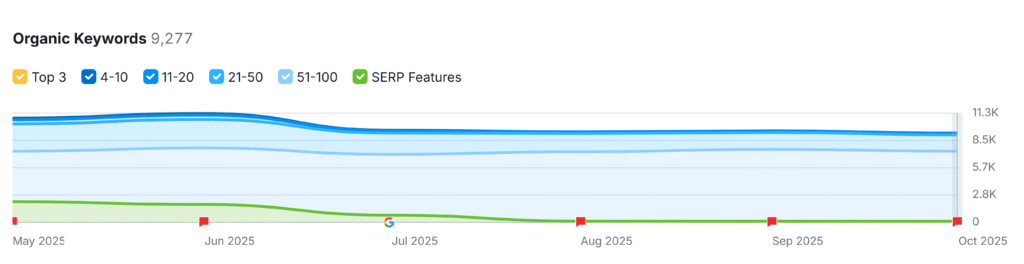
How to Use Semrush
Use Semrush as your command centre for all client SEO operations. Start by auditing each client’s site, researching competitors, and building keyword maps. Set up position tracking and automate reporting under Projects.
| Task | Action | Benefit |
|---|---|---|
| Site Audit | Run a site audit for each client project | Detects technical SEO issues early |
| Keyword Research | Use Keyword Magic Tool | Identifies high-value opportunities |
| Competitor Analysis | Use Domain Overview | Reveals competitor traffic and keywords |
| Reporting | Set up automated dashboards | Saves hours in weekly reporting |
| Backlink Audit | Use Backlink Analytics | Tracks toxic or lost backlinks |
2. Ahrefs: Ideal for monitoring, link building and keyword tracking
If your agency prioritizes backlink acquisition and monitoring, Ahrefs delivers unmatched capabilities. At $449/month for agency plans, it’s premium-priced but comes packed with powerful link building tools and comprehensive keyword tracking. The platform is trusted by 44% of Fortune 500 companies, with over 19,500 new users joining weekly. For agencies focused on technical SEO and content strategy, Ahrefs provides exceptional competitive intelligence.
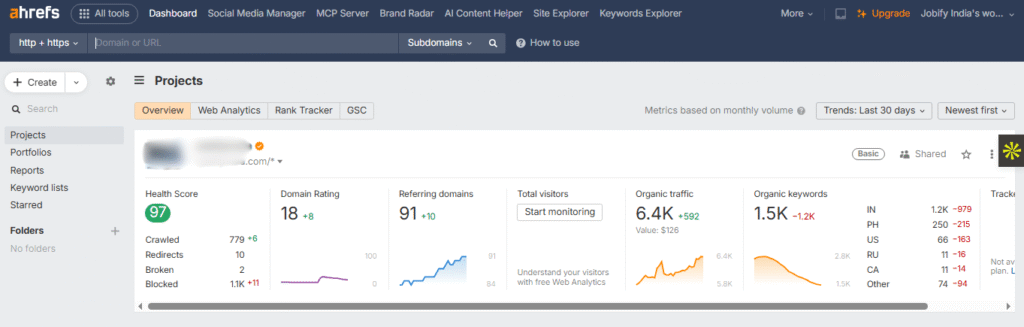
How to Use Ahrefs
Use Ahrefs to power your backlink campaigns and content strategy. Start with competitor research, then identify link gaps and outreach targets. Use Rank Tracker for position monitoring and Site Explorer for in-depth domain insights.
| Task | Action | Benefit |
|---|---|---|
| Backlink Audit | Run Site Explorer | Analyses link profiles for strengths and risks |
| Keyword Tracking | Use Rank Tracker | Tracks keyword performance across regions |
| Competitor Benchmarking | Use Content Gap tool | Finds content opportunities competitors rank for |
| Outreach Planning | Export referring domains | Simplifies link-building campaigns |
| Content Strategy | Use Keywords Explorer | Identifies trending keywords for blog plans |
3. Rankability: Best SEO Workflow & Project Management Platform
Managing 23 clients simultaneously is the reality for many SEO agencies, according to BrightLocal. Rankability stands out by combining SEO capabilities with project management, helping teams track resources, assign tasks, and manage client deliverables efficiently. This all-in-one platform streamlines workflows and automates client research, such as competitor analysis and keyword gap identification.
How to Use Rankability
Use Rankability as your SEO project tracker. Assign SEO tasks, integrate with tools like Google Analytics, and automate client updates.
| Task | Action | Benefit |
|---|---|---|
| Project Management | Create client-specific workspaces | Keeps client workflows organized |
| Task Tracking | Assign deliverables to team members | Improves accountability |
| Keyword Research | Use built-in keyword tools | Automates keyword mapping |
| Reporting | Auto-generate client updates | Reduces manual reporting time |
| Competitor Analysis | Compare client vs rival performance | Reveals content or link gaps |
4. Screaming Frog: Best for technical SEO audits
For technical SEO specialists, Screaming Frog remains unbeatable. At $199/year with a generous free version available, it’s incredibly cost-effective for crawling websites and identifying technical issues. While industry giants try to incorporate similar features, Screaming Frog’s specialized focus on technical audits makes it a must-have in any agency’s toolkit. Its detailed reports help spot issues that other platforms often miss.
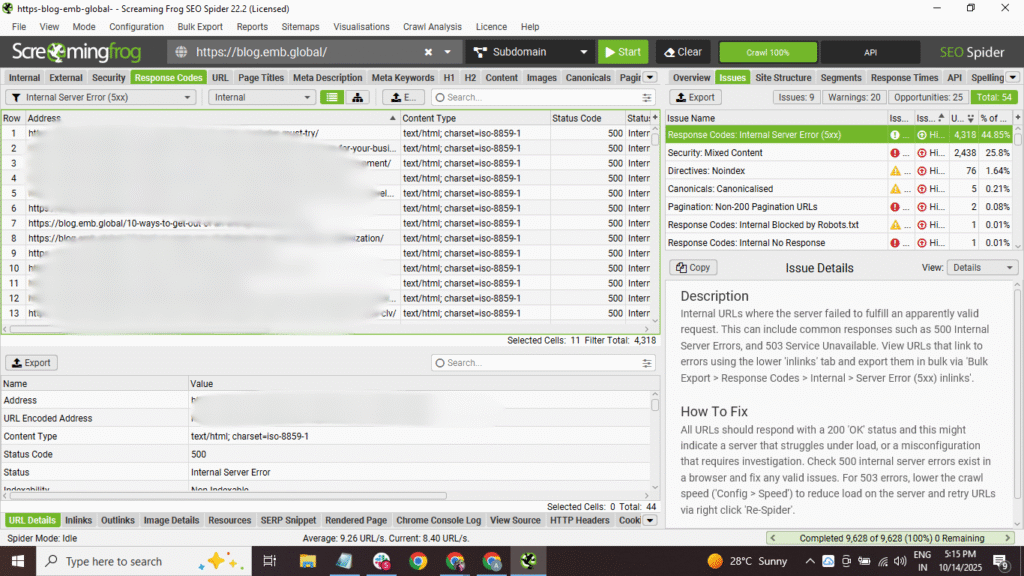
How to Use Screaming Frog
Install Screaming Frog locally and run crawls for each client’s site. Use filters for broken links, duplicate content, and missing metadata.
| Task | Action | Benefit |
|---|---|---|
| Full Site Crawl | Enter URL and start crawl | Identifies broken links and 404 errors |
| Metadata Review | Export Title/Meta reports | Optimizes on-page elements |
| Duplicate Check | Use Content tab | Flags duplicate pages |
| Sitemap Creation | Generate XML sitemaps | Ensures search engine discoverability |
| Custom Extraction | Use XPath/CSS Path | Gathers custom SEO data points |
5. Rayo: Best AI-driven SEO Audit & Automation Tool for Agencies
As a newer entrant, Rayo is making waves with its AI-powered approach to SEO auditing and automation. The platform helps agencies save significant time by automating routine tasks and providing intelligent recommendations for client websites. Rayo’s strength lies in making complex SEO tasks more efficient, allowing agencies to handle more clients without sacrificing quality.
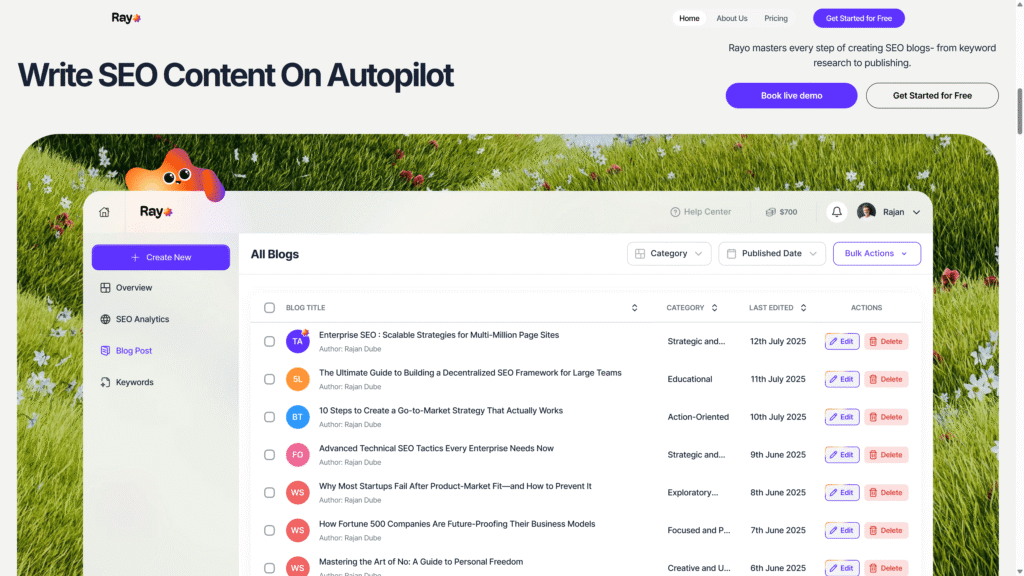
How to Use Rayo
Set up your agency dashboard, input client URLs, and run AI-powered audits. Use built-in suggestions for content refreshes, keyword clustering, and on-page fixes.
6. BrightLocal: Best for local SEO and citation tracking
For agencies with local business clients, BrightLocal is essential. Priced between $39-$79 monthly, it specializes in citation building, review monitoring, and local rank tracking. Agencies report saving up to 80% of time previously spent on manual local SEO tasks. What used to take 10 hours manually can now be accomplished in just 10 minutes with BrightLocal’s automated workflows.
How to Use BrightLocal
Run local audits for clients, manage their online listings, and track local rankings.
| Task | Action | Benefit |
|---|---|---|
| Citation Audit | Use Citation Tracker | Finds incorrect or missing listings |
| Review Monitoring | Activate Reputation Manager | Tracks customer reviews in real time |
| Rank Tracking | Use Local Rank Tracker | Monitors visibility across multiple locations |
| Competitor Benchmarking | Compare local pack presence | Identifies local SEO gaps |
| Reporting | Auto-schedule reports | Streamlines client updates |
7. AgencyAnalytics: Top client reporting dashboard for SEO
Client reporting can eat up valuable agency time, but AgencyAnalytics solves this problem elegantly. Starting at $79/month with a 14-day free trial, it centralizes data from various SEO platforms into customizable, white-label dashboards. Over 7,000 agencies have switched from manual reporting to AgencyAnalytics, saving hours of work while delivering more professional, real-time reports to clients.
How to Use AgencyAnalytics
Connect all your clients’ SEO tools (Semrush, Ahrefs, GSC) and create branded dashboards.
| Task | Action | Benefit |
|---|---|---|
| Tool Integration | Connect SEO & PPC accounts | Consolidates all client data |
| Dashboard Setup | Use white-label branding | Customizes reports for each client |
| Automated Reporting | Schedule periodic updates | Saves hours on manual reporting |
| Performance Alerts | Enable goal tracking | Flags major changes in visibility |
| Multi-Client Management | Create sub-accounts | Organizes client data efficiently |
8. ChatGPT: Best AI-powered SEO Assistant for Content & Research
ChatGPT has evolved into an essential SEO assistant, particularly for content creation and market research. Starting at just $20/month, it’s surprisingly affordable compared to traditional SEO tools. Agencies can leverage it for keyword research, content ideation, and SERP analysis. While it won’t replace your content team, it can dramatically speed up production workflows and help scale quality content creation across multiple client accounts.
How to Use ChatGPT
Prompt ChatGPT for keyword clusters, content briefs, and optimization ideas. Combine insights with SEO tools for validation.
| Task | Action | Benefit |
|---|---|---|
| Keyword Research | Prompt for keyword ideas | Expands content targeting quickly |
| Content Outlines | Ask for detailed briefs | Simplifies content planning |
| SERP Analysis | Prompt for ranking summaries | Reveals competitor content patterns |
| Title/Meta Writing | Generate SEO titles & descriptions | Improves CTR performance |
| Client Content Scaling | Use in content workflows | Boosts output across multiple projects |
9. Surfer SEO: Best on-page content optimization software
Content optimization is crucial for ranking success, and Surfer SEO excels at guiding this process. Trusted by over 150,000 content creators and agencies, it analyzes top-ranking content to provide actionable recommendations on word count, keyword usage, and content structure. The platform now also optimizes content for visibility in both Google and AI chats like ChatGPT, making it future-proof for evolving search trends.
How to Use Surfer SEO
Open the Content Editor, input your target keyword, and optimize your draft according to the real-time score.
| Task | Action | Benefit |
|---|---|---|
| Content Analysis | Run Content Editor | Provides optimization score |
| Keyword Density | Follow in-editor guidelines | Improves on-page balance |
| Competitor Benchmark | Compare SERP results | Refines competitive edge |
| Outline Generation | Use SEO Outlines | Speeds up content production |
| Integration | Connect with Google Docs | Streamlines workflow |
10. SE Ranking: Great white-label SEO platform for agencies
SE Ranking earns its spot with a rare combination: comprehensive SEO functionality paired with robust white-labeling features. At $207.20/month with a 14-day trial, it provides quality analysis at a budget-friendlier price than competitors. Agencies particularly value its customizable reporting and client management features, which allow for seamless branding of all deliverables.
How to Use SE Ranking
Add client projects, customize the interface with your agency branding, and automate reports.
| Task | Action | Benefit |
|---|---|---|
| Keyword Tracking | Add keywords & locations | Tracks rankings across clients |
| Backlink Monitoring | Use backlink tool | Evaluates link quality |
| Website Audit | Run regular crawls | Detects technical SEO issues |
| White-Label Setup | Brand your reports | Builds client trust |
| Competitor Analysis | Use SERP Analyzer | Reveals strengths & weaknesses |
Quick Comparison Table: Features and Pricing Overview
| Tool | Key Strength / Use Case | Approx. Pricing* | Multi-client / Agency Features |
|---|---|---|---|
| Semrush | All-in-one SEO platform (audit, keywords, content, competitive research) | $139.95/mo (Pro) • $249.95/mo (Guru) • $499.95/mo (Business) (DemandSage) | Projects & user limits increase at higher tiers; agency plans include extended quotas & API access |
| Ahrefs | Backlink analysis, keyword tracking, competitive insights | Plans from ~$129/mo to $999+ (Enterprise) (Self Made Millennials –) | Full tool access for all core modules, scalable credits, domain comparison & content gap tools |
| SE Ranking | White-label SEO & rank tracking, good for budget-conscious agencies | $52/mo (Essential) → $95.20/mo (Pro) → $207.20/mo (Business) (SE Ranking) | Unlimited projects, client seats via “Agency Pack,” white-label reporting, API & branding add-ons |
| Screaming Frog | Deep technical SEO crawl & diagnostics | £159/year (approx. $199 USD) for full version, with free limited version available | Local installation, unlimited # of URLs, exportable data for clients |
| BrightLocal | Local SEO, citation & review monitoring | $39–$79/month (depending on plan and number of locations) | Multiple clients, local rank tracking, citation audit, reputation management |
| AgencyAnalytics | Centralized client reporting dashboard | From ~$79/mo (base) | White-label dashboards, multiple client accounts, integrations with SEO & analytics tools |
How to Use the Best Tool According to Your Needs
Every agency’s SEO stack looks different depending on team size, service offerings, and client goals. The trick isn’t to subscribe to every tool, it’s to pick the ones that directly enhance your workflow and deliver measurable value.
1. For Full-Service Agencies
Start with Semrush or Ahrefs as your foundation. These platforms cover everything from keyword research and site audits to backlink tracking and competitive analysis, helping agencies manage SEO for multiple clients seamlessly.
2. For Technical SEO Specialists
Choose Screaming Frog or SE Ranking for deep technical insights. Use them to detect crawl errors, missing tags, schema issues, and indexing problems that can quietly affect your clients’ performance.
3. For Content-Driven Agencies
Pair Surfer SEO with ChatGPT for maximum efficiency. ChatGPT speeds up keyword ideation and outline creation, while Surfer refines each piece for on-page SEO, structure, and SERP performance.
4. For Local SEO Agencies
If your clients depend on map visibility or local traffic, BrightLocal is a must-have. It automates citation management, monitors local rankings, and keeps track of online reviews in one place.
5. For Reporting-Heavy Agencies
Go with AgencyAnalytics or Rayo if reporting is your pain point. Both tools centralize data from multiple sources, automate report generation, and allow for branded client dashboards that look professional and save time.
Pro tip: Most agencies find success with a mix of two to three tools, one for data and research, one for content or auditing, and one for reporting. The goal is balance and efficiency, not tool overload.
Conclusion
Selecting the right seo tools for agency use can dramatically impact your team’s efficiency and client results. The platforms highlighted above offer specialized features designed for agencies managing multiple clients and complex campaigns. Whether you prioritize comprehensive analysis, reporting, local SEO, or content optimization, there’s a tool that fits your specific needs. The best approach is often combining several specialized tools rather than relying on a single solution, creating a custom tech stack that aligns with your agency’s unique service offerings and client base.
FAQs
What are the best SEO tools for agencies starting in 2025?
For agencies just starting out, consider Semrush for comprehensive capabilities, AgencyAnalytics for client reporting, and Screaming Frog for technical audits. These three form a solid foundation that can be expanded as your client roster grows.
How to choose the right SEO software for digital agencies?
Evaluate your specific client needs, budget constraints, and team size. Prioritize tools that offer multi-user access, scalable pricing, and features that align with your service offerings. Always take advantage of free trials before committing.
Are there SEO tools with white-label reporting for agencies?
Yes, several tools offer robust white-label capabilities, with SE Ranking and AgencyAnalytics standing out for their customizable reporting options that allow complete agency branding without revealing the underlying platform.
Which top SEO platforms for agencies offer client reporting?
AgencyAnalytics, Semrush, and SE Ranking offer the strongest client reporting features, allowing agencies to create automated, customized reports that showcase campaign progress in client-friendly formats.
Is there SEO software for agencies that integrates with CRMs?
Yes, many of the top platforms offer CRM integrations. Semrush, AgencyAnalytics, and BrightLocal provide various integration options with popular CRMs like Salesforce, HubSpot, and custom solutions through API connections.

Ridam Khare is an SEO strategist with 7+ years of experience specializing in AI-driven content creation. He helps businesses scale high-quality blogs that rank, engage, and convert.



