
Everyone thinks blogging in 2025 means churning out AI-generated content three times a week and watching the traffic roll in. That strategy worked for about six months in 2023. Now it’s the fastest way to tank your site’s authority and waste your hosting fees.
Starting a blog today requires a fundamentally different approach than what worked even two years ago. Google’s latest algorithm updates have decimated sites that rely on thin, formulaic content, while rewarding those who actually understand their audience’s problems and solve them with depth and personality. The good news? This creates massive opportunities for beginners who are willing to do things right from day one.
You don’t need a massive budget or years of experience to build a successful blog anymore. What you need is a clear strategy, the right tools, and the discipline to avoid the mistakes that kill 90% of new blogs within their first year. Sound overwhelming? It’s not.
Essential Steps to Start Your Blogging Journey
No matter your niche, every creator follows a unique path – here’s how to navigate your blogging journey from idea to authority.
Choose Your Blog Platform and Domain Name
Your platform choice will either accelerate or handicap your growth for years to come. WordPress.org (not .com) remains the only serious option if you want full control and scalability. Yes, Wix and Squarespace look prettier out of the box. They’re also why so many bloggers hit a ceiling at 10,000 monthly visitors.
Your domain name needs to be memorable, brandable, and preferably under 15 characters. Skip the clever puns and keyword-stuffed domains like “best-cheap-laptops-reviews-2025.com” – Google sees right through that nonsense now. Pick something you won’t be embarrassed to put on a business card. Use Namecheap or Google Domains to check availability and grab it for about $12 per year.
Set Up WordPress Hosting and Basic Configuration
Here’s where most beginners make their first critical error: choosing the cheapest hosting they can find. That $2.99/month plan from GoDaddy will have your site loading like it’s 1999 by the time you hit 1,000 daily visitors. Start with managed WordPress hosting from Cloudways, WP Engine, or at minimum, SiteGround’s GrowBig plan.
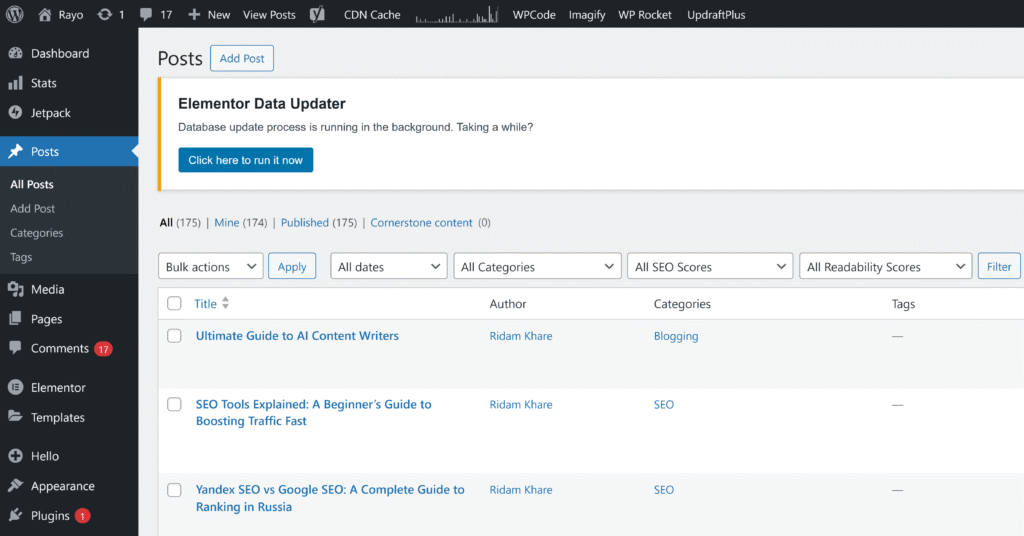
The setup process takes about 17 minutes if you follow the host’s one-click WordPress installation. Don’t overthink the initial settings – you can change everything later. Just make sure to:
- Set your permalinks to “Post name” structure immediately
- Install an SSL certificate (most hosts include this free)
- Delete the default “Hello World” post and sample page
- Create a robots.txt file that blocks search engines until you’re ready to launch
Select a Clean Blog Design and Theme
Your theme is not your brand. I’ve watched bloggers spend three months tweaking colors and fonts while publishing zero content. Pick something clean, fast, and mobile-responsive, then move on. GeneratePress, Astra, or Kadence work perfectly and cost under $60 for the pro version.
The only design elements that actually matter for conversions: readable fonts (16px minimum), plenty of white space, and a navigation menu that doesn’t require a treasure map. Everything else is procrastination disguised as perfectionism.
Install Essential Plugins for SEO and Performance
Plugin bloat kills more sites than bad content ever will. You need exactly five plugins to start:
| Plugin | Purpose | Why It’s Essential |
|---|---|---|
| Rank Math or Yoast SEO | On-page optimization | Handles meta descriptions, sitemaps, schema markup |
| WP Rocket | Speed optimization | Can cut load times by 50% with one click |
| UpdraftPlus | Automated backups | Because losing six months of work hurts |
| Akismet | Spam protection | Blocks 99% of comment spam automatically |
| MonsterInsights | Analytics tracking | Shows what content actually drives results |
That’s it. No social sharing buttons, no fancy sliders, no “related posts” widgets. Get to 10,000 monthly visitors first, then worry about the bells and whistles.
Create Your About Page and Contact Information
Your About page will be your second-most visited page after the homepage. Most beginners write three paragraphs about their hobbies and call it done. Wrong approach. Your About page needs to answer one question: “Why should I trust you on this topic?”
Structure it like this: Start with what problem you solve for readers (not your life story). Add 2-3 specific credentials or experiences that establish authority. Include a professional photo – iPhone portrait mode works fine. End with a clear way to contact you. A simple contact form using WPForms or Contact Form 7 beats a naked email address every time.
Content Creation Strategies That Work in 2025
Research Keywords Using AI-Powered Tools
The days of targeting “credit cards” or “weight loss” as a new blogger are over. You need keywords with search volume between 100-1000 monthly searches and keyword difficulty under 30. Sounds specific? That’s the point.
Tools like Ahrefs, SEMrush, or even the free version of Ubersuggest can find these opportunities in minutes. But here’s the trick nobody talks about: look for keywords where the top 10 results are forum posts, Quora answers, or sites with domain authority under 40. These are your golden tickets. A well-written 2,000-word post can outrank them within 3-6 months.
Once you’ve finalized your topic, focus on learning how to write a blog post that ranks and truly helps readers.
Write Your First Blog Post with Proper Structure
Your first post sets the tone for everything that follows. Don’t write about why you started a blog – nobody cares yet. Pick one specific problem your target audience faces and solve it completely. How do we blog successfully? By being useful from day one.
Before you start, it’s worth understanding the different types of blogs that exist – from personal storytelling to B2B content marketing.
Every post needs this structure: Hook them in the first 150 words. State the problem clearly. Provide the solution in logical steps. Add examples or case studies. Summarize the key takeaways. The magic happens when you write like you’re explaining something to a smart friend over coffee, not lecturing a classroom.
“The difference between a blog post and an article? A blog post feels like the author is sitting across from you, sleeves rolled up, sketching ideas on a napkin. An article feels like a textbook.”
Add Multimedia Elements to Enhance Engagement
Text-only blogs are dying. But before you panic about creating custom graphics, understand this: a simple annotated screenshot often outperforms a $500 custom infographic. Use Snagit or even the free Awesome Screenshot extension to capture and mark up images that support your points.
Videos don’t need Hollywood production values either. A 2-minute Loom recording showing how to do something beats ten paragraphs of instructions. Embed relevant YouTube videos when they add value. Just remember – multimedia supports your message, it doesn’t replace solid writing.
Optimize Content for Featured Snippets and Voice Search
Featured snippets – those answer boxes at the top of Google – drive 35% of clicks for informational queries. Getting them isn’t rocket science. Find questions your audience asks, then answer them directly in 40-60 words immediately after using the question as a subheading.
Voice search optimization is even simpler: write how people talk. Instead of targeting “best Italian restaurants NYC,” think “What’s the best Italian restaurant near Times Square?” Natural language queries are exploding with smart speakers in 60% of homes. You might as well position yourself for where search is heading, not where it’s been.
Make your workflow smoother with best content writing tools that handle ideation, editing, and SEO research.
Update and Refresh Old Content Regularly
Here’s a number that should terrify you: 91% of content gets zero traffic from Google. Most of it isn’t bad – it’s just outdated. Set a calendar reminder to update your posts every six months. Change statistics, add new examples, update screenshots, and expand sections that get the most comments or questions.
Content decay is real. That comprehensive guide you wrote in January? By December, half the information could be wrong and Google knows it. I’ve seen traffic triple just from spending two hours updating a year-old post with fresh data and examples.
Common Blogging Mistakes Beginners Must Avoid
1. Choosing Quantity Over Quality Content
Publishing daily garbage won’t build an audience – it’ll bury your good content under a mountain of mediocrity. One exceptional 3,000-word guide per week beats seven 500-word filler posts. Every time.
Think about it like hosting dinner parties. Would you rather have one memorable feast per month or serve microwave dinners every night? Your readers feel the same way about your content.
2. Ignoring SEO and Keyword Research
Writing without keyword research is like opening a restaurant without checking if anyone in the neighborhood likes your type of food. Sure, you might get lucky. But why gamble when the data is right there?
Basic SEO isn’t optional anymore. Use your primary keyword in the title, first paragraph, and 2-3 subheadings. Add related keywords naturally throughout. Include meta descriptions. Create internal links. This isn’t gaming the system – it’s helping Google understand what you’re writing about.
3. Neglecting Email List Building from Day One
Every blogger who’s been doing this for more than two years will tell you their biggest regret: not starting an email list immediately. Social media platforms change their algorithms and organic reach dies and your Instagram account could disappear tomorrow and you’d lose everything. But email? That list is yours forever.
Start with ConvertKit or MailerLite (both free up to 1,000 subscribers). Create a simple lead magnet – a checklist, template, or quick guide related to your best content. Add opt-in forms to your sidebar and below posts. Even 10 subscribers in month one is better than waiting for “someday.”
4. Writing Without Understanding Your Audience
Who exactly are you writing for? “Everyone interested in my topic” isn’t an answer. Get specific. Are they beginners or intermediates? What problems keep them up at night? What solutions have they already tried that didn’t work?
Create a simple reader persona: Give them a name, age, job title. List their three biggest challenges. Note where they hang out online. Write every post as if you’re addressing that specific person. Generic content appeals to nobody.
5. Inconsistent Publishing Schedule
Momentum matters more than frequency. Publishing three posts in one week then ghosting for two months trains readers not to come back. Pick a schedule you can maintain for six months – even if that’s just twice per month – and stick to it religiously.
Set up an editorial calendar using Notion, Trello, or even Google Calendar. Batch write when you’re inspired. Having three posts ready in drafts removes the pressure and prevents those guilt-induced, rushed articles that you’ll cringe at later.
If you’re serious about writing quality content consistently, explore our content writer’s guide for structure and flow tips.
6. Poor Blog Design and User Experience
If readers need more than three seconds to understand what your blog is about and how to navigate it, you’ve already lost them. The fancy parallax scrolling and popup animations you love? They’re driving people away.
- ✓ Mobile-responsive design (over 60% of traffic is mobile now)
- ✓ Fast load times (under 3 seconds or people bounce)
- ✓ Clear navigation menu with logical categories
- ✓ Readable fonts and sufficient contrast
- ✓ Search function that actually works
7. Skipping Content Promotion and Social Media
The “build it and they will come” strategy died with Field of Dreams. You need to spend as much time promoting content as creating it. But here’s what drives me crazy – most beginners spam their link everywhere and wonder why nobody clicks.
Smart promotion means: Sharing valuable excerpts (not just links) on social media. Answering related questions on Reddit and Quora with helpful responses that happen to reference your post. Reaching out to people you mentioned in your content. Building relationships with other bloggers in your niche before asking for anything.
Taking Your Blog from Zero to Success
Success in blogging isn’t about one viral post or getting lucky with an algorithm. It’s about consistently publishing content that solves real problems for real people, then making sure those people can actually find it. The bloggers winning in 2025 aren’t the ones with the fanciest designs or the most posts – they’re the ones who understand their audience deeply and serve them relentlessly.
Start with the fundamentals: solid hosting, clean design, and strategic keyword research. Focus on quality over quantity. Build your email list from day one. And please, for the love of all that is holy, stop trying to game the system with shortcuts and hacks. Google’s AI is smarter than you think.
The path from zero to 100,000 monthly visitors isn’t mysterious anymore. It’s been mapped by thousands of successful bloggers. The only question is whether you’ll follow the map or wander around hoping to stumble upon success. Your choice.
Read Next: Best Blogging Platforms in 2025
FAQs
How much does it cost to start a blog in 2025?
You can start for under $100 per year if you’re strategic. Domain name: $12. Hosting: $60-120 for decent shared hosting. Premium theme: $50-60 (optional but recommended). The tools that really move the needle (keyword research, email marketing) offer free tiers that work fine until you hit 1,000 monthly visitors. Avoid the temptation to buy every course and tool marketed to you – most are just procrastination in disguise.
How long does it take to make money from blogging?
Anyone promising income in three months is lying. The realistic timeline: 6-12 months to see your first dollar, 12-18 months to cover your costs, 2-3 years to replace a day job income (if you’re consistent and strategic). The outliers who succeed faster usually bring an existing audience or invest heavily in paid promotion. Plan for the marathon, not the sprint.
Is AI content acceptable for blog posts in 2025?
Spammy content gets penalized hard by Google’s helpful content update. But AI as a writing assistant? That’s just smart. Use it for research, outlines, and first drafts. Then inject your personality, experiences, and unique insights. The sweet spot is 20% AI efficiency, 80% human expertise and voice. Readers can smell generic AI content from a mile away.
Which social media platforms drive the most blog traffic?
Pinterest remains the dark horse that nobody talks about – it drives more blog traffic than Instagram and TikTok combined for most niches. LinkedIn works incredibly well for B2B content. Twitter/X is great for real-time engagement but terrible for evergreen traffic. Facebook groups (not pages) still convert if you provide value first. Pick two platforms maximum and master them instead of being mediocre everywhere.
How often should beginners publish new blog posts?
Quality beats frequency every single time. Two thoroughly researched, 2,000+ word posts per month will outperform daily 500-word updates. The key is consistency – whatever schedule you choose, stick to it for at least six months. Readers need to trust that you’ll show up. Once you’ve built that trust and have 50+ quality posts published, you can experiment with frequency.

Ridam Khare is an SEO strategist with 7+ years of experience specializing in AI-driven content creation. He helps businesses scale high-quality blogs that rank, engage, and convert.