

Most SEO guides treat sitemaps like an afterthought – a checkbox item you tackle after the “real” optimization work is done. That backwards thinking is costing sites millions of potential visitors. A properly optimized sitemap doesn’t just help search engines find your pages; it actively shapes how they prioritize and understand your entire site architecture.
Essential XML Sitemap Best Practices for Optimal Crawling
Your XML sitemap is essentially a VIP guest list for search engines. Get it wrong, and you’re making Googlebot wait in line behind pages that don’t matter. Get it right? You control exactly how crawlers move through your site.
1. Keep Your Sitemap Under 50MB and 50,000 URLs
Google enforces hard limits on sitemap files: 50MB uncompressed and 50,000 URLs maximum. Hit either ceiling and your sitemap becomes invisible to crawlers past that point. Most sites never approach these limits, but if you’re running an e-commerce platform with thousands of product pages or a news site with years of archives, you need to pay attention.
The fix is simple. Split your sitemap.
Create separate sitemaps for different content types – one for products, another for blog posts, maybe a third for category pages. Each stays well under the limits and gives you better control over crawl priorities. You can even compress your sitemaps using gzip to squeeze more URLs into that 50MB limit (though the 50,000 URL cap still applies).
2. Include Only Canonical URLs
Here’s where things get messy. You submit a sitemap with duplicate pages, parameter variations, and non-canonical URLs. Now Google’s confused. Which version matters? The crawler wastes time on duplicates while your important pages sit ignored.
Your sitemap should contain only the canonical versions of your URLs. No tracking parameters, no session IDs, no sorting variations. Just the clean, primary URL you want ranking. Think of it like this: if you wouldn’t want it showing up as the main result in Google, it doesn’t belong in your sitemap.
Google will spend less time crawling pages which are not canonical versions. This helps them focus crawl budget on existing or new canonical pages.
Screaming Frog
3. Update Your Sitemap with Fresh Content Immediately
Static sitemaps are dead weight. When you publish new content and wait days or weeks to update your sitemap, you’re essentially hiding that content from search engines during its most critical period – right after publication when it’s most likely to rank.
Set up dynamic sitemap generation. The moment you hit publish on a new page, it should appear in your sitemap. Most modern CMS platforms handle this automatically, but double-check yours. WordPress users can use plugins like Yoast or RankMath that update sitemaps in real-time. Custom builds need a script that regenerates the sitemap whenever content changes.
4. Use Sitemap Index Files for Large Websites
Managing a site with hundreds of thousands of pages? A single sitemap won’t cut it. You need a sitemap index file – basically a sitemap of sitemaps. It’s like having a table of contents that points to individual chapters.
Structure it logically:
sitemap-posts-2024.xml for blog content
sitemap-products-category-1.xml for specific product categories
sitemap-pages.xml for static pages
sitemap-images.xml for image content
Each sub-sitemap stays focused and manageable. Google processes them more efficiently, and you can update individual sections without regenerating everything.
5. Add Image and Video Sitemap Extensions
Plain XML sitemaps ignore your richest content. If you’re investing in video production or custom photography, why let those assets go undiscovered? Image and video sitemap extensions tell Google exactly what multimedia content lives on each page.
For images, include the image URL, title, caption, and license info. For videos, add thumbnail URLs, descriptions, duration, and upload dates. This extra data doesn’t just help with discovery – it improves your chances of showing up in image and video search results where competition is often lighter.
6. Set Accurate Last Modified Dates
The lastmod tag is your secret weapon for controlling crawl priority. But here’s what drives me crazy: sites that update this timestamp every single day regardless of actual changes. You’re crying wolf to Google, and eventually, they stop listening.
Only update the lastmod date when you make substantial changes to a page. Fixing a typo? Skip it. Rewriting three paragraphs and adding new data? Update it. Google uses these dates to prioritize recrawling, so make them count.
Change Type | Update Lastmod? |
|---|---|
Fixed spelling/grammar | No |
Updated prices/inventory | Yes |
Added new section | Yes |
Changed meta description | No |
Refreshed statistics/data | Yes |
7. Remove Noindex and Blocked Pages
Including noindex pages in your sitemap is like inviting someone to a party then telling them to leave at the door. It confuses search engines and wastes crawl budget. Same goes for pages blocked by robots.txt.
Run this audit monthly: cross-reference your sitemap URLs against your robots.txt file and pages with noindex tags. Any overlap? Remove those URLs from your sitemap immediately. Your sitemap should only contain pages you actively want indexed and ranking.
Sitemap Submission and Monitoring Guidelines
Creating a perfect sitemap means nothing if search engines never find it. And finding it once isn’t enough – you need ongoing monitoring to catch issues before they tank your visibility.
Submit Your Sitemap Through Google Search Console
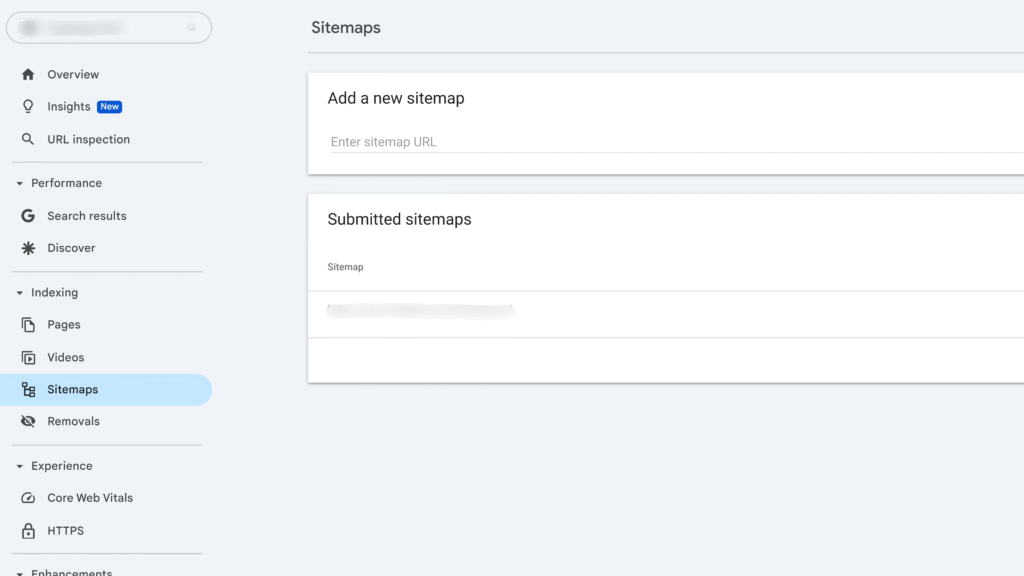
Dropping your sitemap URL in robots.txt isn’t enough anymore. You need direct submission through Google Search Console for proper tracking and error reporting. The process takes under 60 seconds but the insights last forever.
Navigate to the Sitemaps section in GSC, enter your sitemap URL, and hit submit. Within 48 hours, you’ll see detailed stats: how many URLs Google discovered, how many got indexed, and crucially – which ones have issues. This data is gold for troubleshooting indexing problems.
But don’t stop at Google. Submit to Bing Webmaster Tools too. Sure, Bing has smaller market share, but why ignore free traffic?
Monitor Crawl Errors and Coverage Reports
Submitting your sitemap is step one. Monitoring what happens next separates amateur hour from professional sitemap SEO best practices. GSC’s Coverage report shows you exactly how Google processes your sitemap URLs.
Watch for these red flags:
Excluded pages: URLs in your sitemap that Google chose not to index
Crawled but not indexed: Pages Google looked at but deemed not worth including
Discovered but not crawled: URLs sitting in Google’s queue, potentially forever
Each category tells a different story about your site’s health. High numbers of excluded pages might mean quality issues. Discovered but not crawled? Could be a crawl budget problem.
Best Sitemap Generator Tools for Different Platforms
Manual sitemap creation is masochism. Let’s talk tools that actually work, because choosing the wrong sitemap generator can literally break your indexing.
For WordPress sites, Yoast SEO remains the gold standard. It handles dynamic updates, splits sitemaps automatically at 1,000 URLs, and integrates image sitemaps without extra configuration. RankMath offers similar features with a cleaner interface if you prefer that.
Running Shopify? The platform generates sitemaps automatically, but they’re basic. Apps like SEO Manager add the customization you need – excluding specific collections, adding metafields, controlling update frequency.
For custom builds or static sites, Screaming Frog’s SEO Spider is unbeatable. It crawls your entire site and generates a complete XML sitemap with proper lastmod dates, priority scores, and change frequencies. The paid version handles sites over 500 URLs and includes image sitemap generation.
What about online generators? Most are garbage. They crawl superficially, miss dynamic content, and create static files you’ll forget to update. If you must use one, XML-Sitemaps.com is the least terrible option for sites under 500 pages.
Conclusion
Perfect sitemap SEO best practices come down to treating your sitemap as a living document, not a set-it-and-forget-it file. Every URL should earn its spot. Every update should reflect real changes. Every submission should be monitored.
Start with the fundamentals: respect the size limits, include only canonical URLs, and keep those lastmod dates honest. Then layer in the advanced tactics – index files for large sites, multimedia extensions for rich content, and religious monitoring through Search Console.
The sites winning at SEO aren’t necessarily the ones with the best content. They’re the ones that make it easiest for Google to find and understand that content. Your sitemap is that bridge. Build it right, maintain it properly, and watch your indexing rates climb while competitors wonder why their pages aren’t showing up.
Remember: Google can’t rank what it can’t find. Make discovery automatic with these XML sitemap best practices and focus your energy on creating content worth finding.
FAQs
How often should I update my XML sitemap?
Your sitemap should update automatically whenever you publish, modify, or remove content. For static sites, monthly updates work fine. For news sites or e-commerce platforms with frequent changes, daily or even hourly updates make sense. The key is matching update frequency to your publishing cadence.
Can I have multiple sitemaps for one website?
Absolutely. In fact, multiple sitemaps often work better than one massive file. Create separate sitemaps for different content types (blog posts, products, categories) and combine them using a sitemap index file. This approach keeps files manageable and helps search engines process your content more efficiently.
Should I include pagination pages in my sitemap?
Generally no. Pagination pages (page/2, page/3, etc.) rarely deserve indexing on their own. Include only the first page of paginated series in your sitemap. The exception? If paginated pages have unique, valuable content beyond just listings, then consider including them.
What happens if my sitemap exceeds 50,000 URLs?
Google stops processing at URL 50,001. Everything after that limit becomes invisible. The solution is splitting your sitemap into multiple files and creating a sitemap index. Each individual sitemap stays under 50,000 URLs, and the index file points Google to all of them.
Do I need a sitemap if my site has good internal linking?
Even sites with perfect internal linking benefit from sitemaps. While good navigation helps crawlers discover pages, sitemaps provide additional metadata like last modification dates and priority hints. Plus, sitemaps ensure orphaned pages (those without internal links) still get discovered. Think of internal linking as your primary discovery method and sitemaps as your insurance policy.

Ridam Khare is an SEO strategist with 7+ years of experience specializing in AI-driven content creation. He helps businesses scale high-quality blogs that rank, engage, and convert.



