
The green padlock icon next to a website’s URL has become as expected as a close button on a window. Yet most site owners still treat SSL certificates as optional – a nice security feature if you have time to deal with it. That mindset is killing your rankings. Google confirmed HTTPS as a ranking signal back in 2014, and since then, the correlation between SSL implementation and higher search positions has only strengthened. Sites without that padlock aren’t just less secure; they’re actively bleeding organic traffic to competitors who took the thirty minutes to install a certificate.
“HTTPS isn’t just about encryption anymore, it’s a trust signal for both users and search engines. If your site isn’t secure, you’re signaling to Google that you’re outdated.”
— Barry Adams, SEO Consultant at Polemic Digital
What Are SSL Certificates?
An SSL certificate (Secure Sockets Layer) creates an encrypted connection between your web server and a visitor’s browser. Think of it like sending a letter in a locked box instead of on a postcard – only the intended recipient can read what’s inside. When you install an SSL certificate, your site switches from HTTP to HTTPS, with that ‘S’ standing for secure. The certificate contains your website’s public key, your company information, and a digital signature from a trusted Certificate Authority (CA) that browsers recognize.
The technical mechanics involve asymmetric encryption, certificate chains, and handshake protocols. But here’s what actually matters: without SSL, every piece of data traveling between your site and its visitors is visible to anyone monitoring the connection. That includes passwords, credit card numbers, and form submissions. Scary stuff.
Why HTTPS and SSL Certificates Matter for SEO
Google’s algorithm treats HTTPS as a “lightweight” ranking signal, affecting roughly 1% of global queries according to their official statement. That sounds minimal until you realize how competitive organic search has become. In markets where the top five results all have similar content quality and backlink profiles, that 1% boost from SSL SEO often determines who gets position three versus position eight. And the difference between those positions? About 70% of the clicks.
But the ranking boost is just the start. Chrome now displays “Not Secure” warnings on HTTP sites that collect any user data – even a simple contact form. Picture this: a potential customer lands on your site from Google, sees that warning, and immediately bounces back to the search results. Your bounce rate spikes. Your dwell time plummets. Google notices these user signals and adjusts your rankings accordingly. It’s a death spiral that starts with missing three letters: SSL.
The trust factor extends beyond algorithms. Studies show that 84% of users abandon a purchase if data is sent over an insecure connection. Every HTTP page on your site is basically hanging a sign that says “we don’t take security seriously.” Would you trust that business?
Top SSL Certificates for Boosting SEO Performance
Not all SSL certificates are created equal, though from a pure SEO perspective, Google doesn’t care if you spent $0 or $500 on your certificate. The algorithm only checks for valid HTTPS. But different certificates offer varying levels of validation, warranty protection, and technical features that affect your site’s performance and user trust.
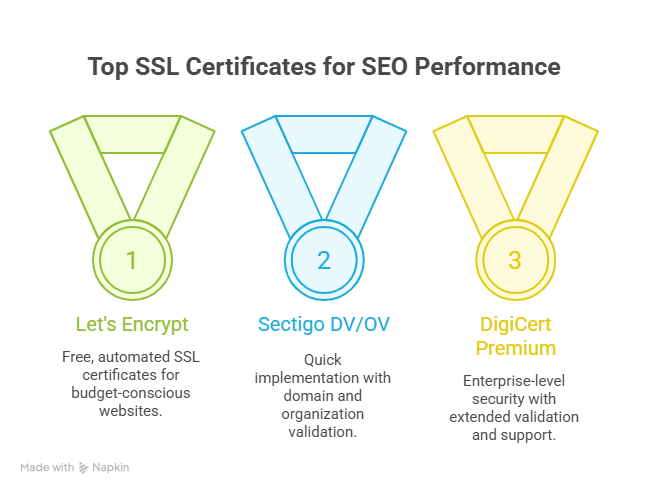
Let me break down the options that actually matter.
1. Let’s Encrypt Free SSL for Budget-Conscious Websites
Let’s Encrypt changed the SSL game by offering completely free, automated certificates. Installation takes about five minutes if your host supports it (most do now). The certificates auto-renew every 90 days, and they work perfectly for blogs, portfolios, and small business sites. The only downside? No warranty coverage and basic domain validation only. But honestly, if you’re just starting out or running a content site, this is all you need.
2. Sectigo DV and OV Certificates for Quick Implementation
Sectigo (formerly Comodo) dominates the commercial SSL market for a reason. Their Domain Validated (DV) certificates issue within minutes and cost around $8 per year. The Organization Validated (OV) options take 1-3 days but display your company name in the certificate details – a nice trust signal for business sites. Both come with warranties up to $500,000. Perfect middle ground.
3. DigiCert Premium SSL for Enterprise-Level Security
When you absolutely need the green address bar (Extended Validation) or are securing multiple subdomains across complex infrastructure, DigiCert delivers. Their certificates start around $300 annually but include priority support, vulnerability assessments, and warranties up to $1.5 million. Overkill for most sites? Yes. Essential for banks, healthcare, and e-commerce platforms processing thousands of transactions? Absolutely.
4. GeoTrust and RapidSSL for Fast Domain Validation
GeoTrust’s True BusinessID takes the prize for fastest OV certificate issuance – often same day. Their budget brand RapidSSL offers basic DV certificates for about $10 per year with 10-minute issuance. Both provide the SHA-256 encryption and 2048-bit keys that modern browsers require. Solid choice for agencies managing multiple client sites.
5. Comodo PositiveSSL for Affordable Multi-Domain Coverage
Need to secure multiple domains without breaking the bank? Comodo’s PositiveSSL Multi-Domain certificate covers up to 100 domains for around $30 per year. Each additional domain costs about $10. The math works out beautifully if you’re managing a portfolio of sites. Just remember – all domains appear in the certificate details, so don’t mix client sites with your personal blog.
Complete SSL Certificate Installation Guide
Here’s where things get interesting. Most SSL installation guides read like stereo instructions from 1987. Let’s fix that.
Pre-Installation Requirements and Certificate Selection
Before you even think about buying a certificate, check these boxes:
Verify you have access to your domain’s DNS records or email
Confirm your hosting plan supports SSL (shared hosting sometimes doesn’t)
Decide between www and non-www as your primary domain
Back up your entire site (because Murphy’s Law is real)
Document all current HTTP URLs for redirect mapping
Pick your certificate based on validation needs, not marketing hype. Running an online store? Get OV minimum. Information site or blog? DV works fine. Need that green bar for trust? EV is your only option.
Step-by-Step Installation Process for Different Platforms
The installation process varies wildly depending on your setup. Here’s what actually works:
For cPanel/WHM Hosting:
Generate a CSR (Certificate Signing Request) through WHM’s SSL/TLS menu
Submit CSR to your certificate provider
Receive certificate files via email (usually within minutes for DV)
Return to WHM, paste certificate and CA bundle in the installation screen
Assign certificate to your domain
For WordPress with Managed Hosting:
Most managed WordPress hosts now offer one-click SSL. SiteGround, WP Engine, and Kinsta all have Let’s Encrypt integration. Just click the button in your hosting dashboard. Done. (This is why managed hosting costs more – convenience.)
For VPS/Cloud Servers:
SSH into your server and use Certbot for Let’s Encrypt, or manually configure Apache/Nginx with your commercial certificate files. The exact commands depend on your server OS and web server software. Not for beginners.
Setting Up 301 Redirects and Updating Internal Links
Installing the certificate is only half the battle. Now you need to force all traffic through HTTPS. Add these rules to your .htaccess file (Apache) or server block (Nginx):
RewriteEngine On
RewriteCond %{HTTPS} off
RewriteRule ^(.*)$ https://%{HTTP_HOST}/$1 [R=301,L]
But wait – your internal links still point to HTTP URLs. Search and replace plugins can help, but be careful. Better approach: update your database directly using WP-CLI or phpMyAdmin. Change all instances of http://yourdomain.com to https://yourdomain.com. Miss even one, and you’ll create mixed content warnings.
Google Search Console Configuration for HTTPS
Google treats HTTP and HTTPS as separate properties in Search Console (annoying, right?). You need to:
Add the HTTPS version as a new property
Verify ownership again
Submit your HTTPS sitemap
Use the Change of Address tool if switching domains
Monitor both properties for 3-6 months during transition
The indexed page count in your HTTPS property should gradually increase while HTTP decreases. If both stay flat, your redirects aren’t working properly.
Common Installation Errors and Troubleshooting Solutions
Let’s talk about the stuff that goes wrong. Because it will.
Mixed Content Warnings: Your page loads over HTTPS but includes HTTP resources (images, scripts, stylesheets). Solution: Use protocol-relative URLs (//example.com/image.jpg) or update all resource links to HTTPS. The free Why No Padlock tool identifies problem resources instantly.
Certificate Chain Errors: Your certificate is valid but browsers show warnings. You probably forgot to install the intermediate certificate (CA Bundle). Reinstall with the complete chain.
Redirect Loops: Page keeps redirecting between HTTP and HTTPS infinitely. Usually caused by conflicting redirect rules or CDN configuration. Check your .htaccess, hosting control panel redirects, and CDN settings. Only one should handle redirects.
Performance Hit: HTTPS adds a handshake that can slow initial connections by 100-500ms. Enable HTTP/2 on your server (requires HTTPS anyway) and implement HSTS headers to minimize the impact. Your pages might actually load faster after the switch.
Maximizing SEO Rankings with SSL Implementation
Simply slapping an SSL certificate on your site won’t magically boost you to position one. The real SEO gains come from doing HTTPS properly and leveraging the security signal alongside other optimizations. Monitor your Core Web Vitals after migration – HTTPS with HTTP/2 often improves LCP and FID scores. Update all external backlinks to HTTPS versions when possible (reach out to high-authority linkers first). And here’s a trick most people miss: add HSTS preloading to skip the initial HTTP request entirely. It’s a small speed boost that adds up.
Remember, SSL is now table stakes for organic visibility. The question isn’t whether you need HTTPS for SEO – it’s how quickly you can implement it before losing more ground to secured competitors. Every day you wait is another day Google trusts your site a little bit less.
Frequently Asked Questions
How much SEO ranking boost does SSL provide in 2025?
Google’s official stance remains that HTTPS is a “lightweight” signal, but real-world data suggests it’s worth 5-10 positions in competitive niches. The indirect benefits (lower bounce rates, higher trust, better Core Web Vitals with HTTP/2) amplify the direct ranking boost significantly.
Can switching to HTTPS temporarily affect existing rankings?
Yes, expect minor fluctuations for 2-4 weeks as Google recrawls and reindexes your HTTPS URLs. Most sites see a temporary 5-10% traffic dip that recovers within a month. Proper 301 redirects and Search Console configuration minimize the disruption.
Which SSL certificate type provides the best SEO benefits?
From a pure algorithm perspective, all valid SSL certificates provide identical SEO value. Google doesn’t differentiate between free Let’s Encrypt and expensive EV certificates. Choose based on business needs and user trust requirements, not SEO impact.
How long does Google take to recognize HTTPS migration?
Google typically identifies the HTTPS switch within 48 hours for frequently-crawled sites. Complete reindexing takes 2-6 weeks depending on site size and crawl budget. You’ll see the HTTPS URLs replacing HTTP in search results gradually during this period.
Do free SSL certificates offer the same SEO advantages as paid ones?
Absolutely. Let’s Encrypt certificates provide identical SEO value to premium options. The only differences are warranty coverage, validation levels, and support quality. For pure search ranking purposes, free certificates work perfectly.

Ridam Khare is an SEO strategist with 7+ years of experience specializing in AI-driven content creation. He helps businesses scale high-quality blogs that rank, engage, and convert.



