
Most e-commerce sites treat SEO like it’s still 2015 – stuffing keywords into product descriptions and hoping for the best. Meanwhile, their competitors are stealing millions in organic traffic using strategies that actually work in today’s algorithm. The gap between outdated SEO tactics and what Google rewards now has never been wider.
What is E-commerce SEO?
E-commerce SEO is the practice of optimizing your online store to rank higher in search engine results when people search for products you sell. But here’s what most guides won’t tell you: it’s fundamentally different from regular website SEO because you’re optimizing for buying intent, not just information seeking. You’re dealing with thousands of similar product pages, complex site architecture, and the constant challenge of inventory changes.
Think of it like organizing a massive warehouse where every single item needs to be findable in seconds. Except this warehouse has invisible customers walking through it 24/7, and Google is the tour guide deciding which aisles to show them first. Get the organization wrong and your products might as well not exist.
Why should e-commerce websites care about SEO?
Here’s a number that should grab your attention: 43% of e-commerce traffic comes from Google organic search. Not paid ads. Not social media. Organic search. That means nearly half your potential customers are finding (or not finding) you based purely on how well you’ve optimized for search engines. And unlike paid traffic that stops the moment you stop paying, organic traffic compounds over time.
But the real kicker? Your conversion rate from organic search is typically 2.4x higher than from social media. These aren’t just browsers – they’re buyers with credit cards in hand, searching for exactly what you sell. Miss out on e-commerce SEO and you’re literally leaving money on the table while your competitors scoop it up.
Getting started with e-commerce SEO
Forget everything you think you know about starting with keyword research. The first thing you actually need is a technical foundation that doesn’t sabotage you from day one. Start by running a crawl of your site (use Screaming Frog or Sitebulb) and look for these three killers: duplicate content from product variations, broken internal links from out-of-stock items, and missing schema markup on your product pages.
Once your foundation is solid, then you can move to the fun stuff. But trying to do keyword optimization on a technically broken site is like painting a house that’s falling down. Pretty pointless.
Top eCommerce SEO Strategies That Drive Results
1. Keyword Research for Product Pages
Most stores make a fatal mistake with product page keywords: they target what they call their products internally, not what customers actually search for. You might call it a “moisture-wicking athletic tee,” but your customers are searching for a “gym shirt that doesn’t smell.” Start building an effective ecommerce keyword strategy to find the exact terms your buyers use. See the disconnect?
Start with Amazon’s search suggestions – seriously. Type in your product category and watch what autocompletes. These are real searches from people ready to buy. Then cross-reference with Google’s “People also ask” boxes and you’ve got a goldmine of long-tail keywords your competitors are missing. Tools like Ahrefs or SEMrush are great, but they often miss the weird, specific queries that convert like crazy.
What You Think They Search | What They Actually Search |
|---|---|
Premium leather wallet | Wallet that fits in the front pocket |
Ergonomic office chair | Chair for back pain under $300 |
Organic face moisturizer | Face cream that won’t cause breakouts |
2. Category Page Optimization
Your category pages are your secret weapon for ranking for high-volume, competitive terms. While everyone else fights over product keywords, you can dominate category searches by implementing ecommerce category page SEO best practices that actually deliver results. Google needs to see these as content-rich landing pages, not just product grids.
Add 300-500 words of unique content to each category page, but make it actually useful. Include a buying guide, explain the differences between subcategories, or answer common questions. Place this content below the product grid (not above – you don’t want to push products down). And for the love of SEO, write unique meta descriptions for each category instead of letting them auto-generate.
3. Product Schema Markup Implementation
Schema markup is like giving Google a cheat sheet about your products. It explicitly tells search engines “this is the price, these are the reviews, this is the availability.” The result? Rich snippets that make your listings stand out with star ratings, prices, and availability right in the search results. Click-through rates jump by 30% on average.
The implementation is straightforward with most ecommerce platforms. Shopify has apps like JSON-LD for SEO, WooCommerce has built-in support, and BigCommerce handles most of it automatically. Just make sure you’re including price, availability, review ratings, and brand at minimum. Test everything with Google’s Rich Results Test tool – if it doesn’t validate, it won’t show up.
4. Internal Linking Architecture
Your internal linking should work like a spider web, connecting related products and categories naturally. Every product should link to at least 3–5 related items, its parent category, and relevant blog content. For an in‑depth look at structuring internal links effectively, refer to ecommerce internal linking strategies.
But don’t just spam links everywhere. Use descriptive anchor text that actually helps users and search engines understand the relationship. “Check out our other products” is useless. “Similar wireless headphones under $100” tells everyone exactly what they’ll find. Smart.
5. User-Generated Content Strategy
Reviews aren’t just social proof, they’re SEO gold. Every review adds unique content to your product pages, naturally includes long-tail keywords, and keeps your pages fresh. Pair this with SEO-friendly product descriptions to boost your rankings and sales even further. Pages with reviews see 15-20% more organic traffic on average.
But here’s the advanced move: add a Q&A section to product pages. Customers ask specific questions using natural language (perfect for voice search), and answers create even more unique content. Implement review schema while you’re at it, and watch those star ratings light up your search listings.
“The best ecommerce SEO strategies don’t feel like SEO at all – they feel like making your store more useful for actual humans. Google just happens to reward that.”
6. Mobile-First Optimization
Google has been mobile-first indexing since 2019, but most ecommerce sites still treat mobile as an afterthought. Your mobile site IS your site as far as Google’s concerned. If your product images take 8 seconds to load on 4G, or your add-to-cart button is impossible to tap, you’re not just losing sales – you’re losing rankings.
Run your site through Google’s Mobile-Friendly Test and fix everything it flags. Compress large product images with ecommerce image optimization techniques to improve speed without losing quality, implement lazy loading, and ensure your touch targets are at least 48×48 pixels.
7. Site Speed and Core Web Vitals
Page speed has been a ranking factor forever, but Core Web Vitals made it scientific. You now have three specific metrics Google measures: LCP (how fast your main content loads), FID (how quickly users can interact), and CLS (how much stuff jumps around while loading). Fail these and watch your rankings tank.
The fastest win? Optimize your images properly. Use WebP format, implement responsive images with srcset, and lazy load everything below the fold. Then tackle your JavaScript – defer non-critical scripts, remove unused code, and minify everything. Most stores can cut their load time in half just by fixing images and JavaScript. That’s not an exaggeration.
Technical eCommerce SEO Checklist
URL Structure and Canonicalization
Your URL structure should be so simple a five-year-old could understand it. /category/subcategory/product-name works perfectly. What doesn’t work? URLs with parameters like ?color=red&size=large&id=12345. These create duplicate content nightmares that confuse Google and dilute your ranking power.
Canonical tags are your solution for product variants. If you sell the same shirt in five colors, pick one URL as the canonical version and point all variants to it. This consolidates your ranking signals instead of splitting them five ways. Most platforms handle this automatically, but always double-check. One misconfigured canonical tag can tank an entire category’s rankings.
XML Sitemap Configuration
Your XML sitemap is like giving Google a map of your store. But here’s what most people miss: you need separate sitemaps for products, categories, and images. Don’t just dump everything into one massive file. Google limits sitemaps to 50,000 URLs anyway, and most ecommerce sites blow past that.
Set up dynamic sitemaps that automatically update when you add products or they go out of stock. Include only indexable pages (no filtered results or paginated pages beyond the first). And submit each sitemap separately in Google Search Console so you can monitor indexation rates by type. If your product pages aren’t getting indexed but your category pages are, you’ll actually know.
Robots.txt Optimization
Robots.txt is where you tell search engines where NOT to go, and most ecommerce sites get this completely wrong. You want to block crawlers from your cart pages, checkout process, internal search results, and filtered navigation URLs. But be surgical about it – block too much and you’ll accidentally hide important pages.
Here’s a simple rule: if a URL doesn’t provide unique value to search users, block it. Your /cart and /checkout pages? Block them. Your /search?q= results? Definitely block. But be careful with faceted navigation – sometimes those filtered pages actually rank well for specific queries.
Faceted Navigation Solutions
Faceted navigation (those filter options for size, color, price) creates thousands of near-duplicate URLs that can destroy your crawl budget. A clothing store with 10 filters can generate millions of URL combinations from just 100 products. Insane, right?
The solution depends on your platform, but the strategy is universal: only allow indexation of valuable filter combinations. Maybe “red dresses under $50” deserves its own indexed page, but “red dresses under $50 in size medium with free shipping sorted by newest” definitely doesn’t. Use a combination of canonical tags, noindex tags, and robots.txt rules to control the chaos.
Pagination Best Practices
Category pages with hundreds of products need pagination, but Google changed how they handle it in 2019. They no longer use rel=”prev” and rel=”next” tags. Now they treat each paginated page independently. This means your page 2, 3, 4 need to provide unique value or they’re just thin content.
The fix? Make sure your first page can stand alone as the definitive page for that category. Use infinite scroll or “load more” buttons instead of traditional pagination where possible. If you must use pagination, add unique content to each page – different featured products, category descriptions, or buying guides. Never just replicate the same template with different products.
404 Error Management
Discontinued products create 404 errors faster than you can fix them manually. But here’s the thing – not all 404s are bad. If a product is gone forever with no replacement, a 404 is actually the right response. What kills you is when those 404s have backlinks or internal links pointing to them.
Set up automatic redirects for discontinued products to the most relevant category page or similar product. Monitor Google Search Console weekly for 404 errors with impressions (these had rankings you’re now losing). And create a custom 404 page that actually helps users find alternatives instead of just saying “page not found.”
Advanced eCommerce SEO Tools and Implementation
Essential SEO Audit Tools
Stop trying to audit your site manually. You need tools that can crawl thousands of pages and spot issues you’d never find otherwise. Screaming Frog is the industry standard crawler – it’ll find every broken link, missing meta description, and duplicate title on your site. Costs $209/year and worth every penny.
But crawlers only show technical issues. For the full picture, you need Ahrefs or SEMrush to analyze your organic traffic, track rankings, and spot content gaps. Don’t try to use both – pick one and learn it deeply. Most people barely scratch the surface of what these ecommerce SEO tools can do.
Screaming Frog: Technical crawler for finding site issues
Ahrefs/SEMrush: All-in-one SEO suites for research and monitoring
Google Search Console: Free insights directly from Google
GTmetrix: Page speed and performance analysis
Schema Markup Validator: Ensures your structured data works
Keyword Research Platforms
Everyone uses the same keyword tools and wonders why they’re finding the same keywords as their competitors. Want an edge? Use Amazon’s Brand Analytics if you sell there – it shows actual search frequency rank, not estimated volume. Pure gold for product keywords.
For everyone else, combine traditional tools with unconventional sources. Pull questions from Reddit threads about your products. Mine YouTube autocomplete for how-to queries. Use Answer The Public for question-based keywords your competitors ignore. The best converting keywords often have “low” search volume in traditional tools because they’re so specific.
Competitor Analysis Software
Spying on competitors isn’t unethical – it’s smart business. Tools like Ahrefs show you exactly which pages drive their organic traffic, what keywords they rank for, and who’s linking to them. But don’t just copy everything they do. Look for what they’re missing.
Run their site through SEMrush’s site audit and find their technical weaknesses. Check their category pages – are they thin on content? Look at their product schema – are they missing review markup? Find the gaps and exploit them. The goal isn’t to be as good as your competitors. It’s to be better.
Performance Monitoring Solutions
Forget checking your rankings manually every day. Set up automated rank tracking for your money keywords and get weekly reports. Focus on product page optimization for conversions to ensure every visit turns into a sale. Use Google Search Console to monitor impressions and CTR trends, falling CTR often predicts ranking drops.
But here’s what really matters: organic revenue attribution. Connect Google Analytics 4 to your ecommerce platform and track which organic pages actually drive sales, not just traffic. You might find that page getting 100 visits monthly but generating $10,000 in revenue. That’s the page you protect and optimize at all costs.
Mastering eCommerce SEO for Long-Term Success
The stores winning at ecommerce SEO in 2024 aren’t the ones with the biggest budgets or the most products. They’re the ones that understand a fundamental truth: SEO isn’t a project you finish. It’s an ongoing process of making your store more useful for humans while speaking Google’s language fluently.
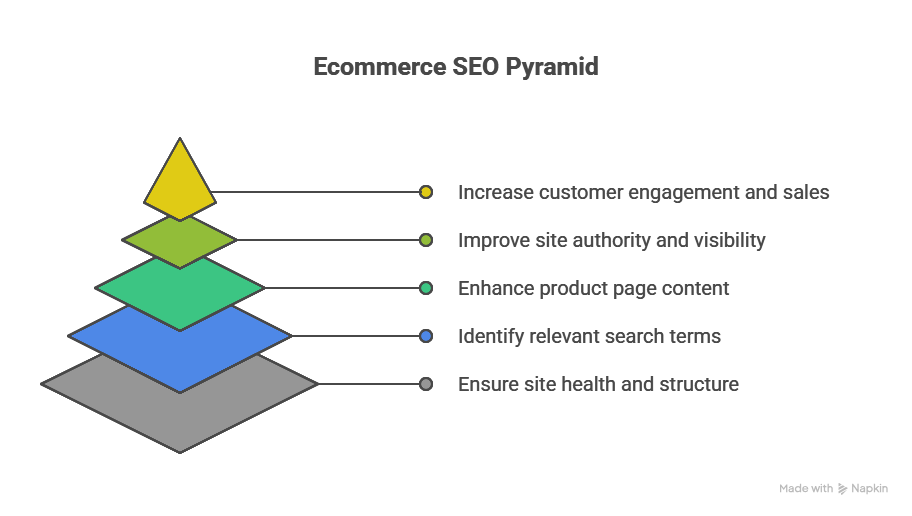
Start with the technical foundation – fix your site speed, implement schema markup, and clean up your URL structure. These aren’t sexy improvements, but they’re the difference between a site Google trusts and one it doesn’t. Then layer on the content strategy: optimize those category pages, encourage reviews, and build internal links that actually make sense.
But here’s the real secret nobody talks about: consistency beats perfection every time. The store that publishes one optimized product page daily beats the store that publishes 50 perfect pages then stops for six months. Google rewards fresh content and consistent improvement. Make ecommerce SEO best practices part of your daily operations, not a quarterly project.
Remember what we started with? Most ecommerce sites are still doing SEO like it’s 2015. That means the opportunity for stores willing to adapt is massive. Every outdated competitor is basically handing you their organic traffic. You just have to be smart enough to take it.
Want to know if your efforts are working? Watch these three metrics: organic traffic to product pages (not just your homepage), organic conversion rate, and pages per session from organic traffic. When all three trend upward, you’re doing something right. When they don’t, revisit this guide and check what you might have missed.
Frequently Asked Questions
How long does it take to see results from ecommerce SEO?
The honest answer that nobody wants to hear: 4-6 months for new sites, 2-3 months for established sites making improvements. But here’s the nuance – you’ll see some movement within weeks (especially from technical fixes), but meaningful traffic and revenue changes take time. Google needs to crawl, index, and trust your changes. Think of it like planting a garden, not flipping a switch.
What’s the difference between ecommerce SEO and regular SEO?
Scale and intent. Regular SEO might optimize 50 pages for informational queries. Ecommerce SEO optimizes thousands of product pages for transactional queries. You’re dealing with duplicate content from product variants, constant inventory changes, and the need to rank for both broad category terms and ultra-specific product searches. Plus, your conversions happen on-site, so user experience signals matter even more.
Should I optimize product descriptions for every single product?
No, and anyone who says yes is trying to sell you something. Focus on your top 20% of products that drive 80% of revenue first. Then optimize category pages and high-traffic products. For the long tail, a good template with unique product specifications is enough. Spending hours optimizing a product that sells twice a year is time you could spend improving pages that actually matter.
How often should I update my ecommerce SEO strategy?
Review monthly, adjust quarterly, overhaul yearly. Check your Search Console data monthly for issues and opportunities. Every quarter, audit your top pages and refresh content that’s losing rankings. Once a year, do a complete technical audit and strategic review. But if Google announces a major update or your traffic suddenly tanks? Drop everything and investigate immediately.
What are the most common ecommerce SEO mistakes to avoid?
The worst mistake? Ignoring technical SEO while obsessing over keywords. Close second: letting out-of-stock products 404 instead of redirecting them. Third: duplicate content from product variants without proper canonicalization. Fourth: thin category pages with no unique content. And finally, the killer – not tracking organic revenue, just traffic. You can’t eat traffic. Revenue is what matters.

Ridam Khare is an SEO strategist with 7+ years of experience specializing in AI-driven content creation. He helps businesses scale high-quality blogs that rank, engage, and convert.



