
Most SEO professionals still believe automation means losing control over quality. They picture generic, robotic processes that churn out mediocre results while missing the nuance that makes great SEO work. The truth? When you combine SEO automation with n8n, you’re not replacing human expertise – you’re amplifying it. Think of it like having a team of tireless assistants who handle the repetitive grunt work while you focus on strategy and creative problem-solving.
Essential n8n SEO Automation Workflows
The real power of n8n lies in its ability to connect disparate SEO tools into cohesive workflows that actually make sense. You’re not just automating random tasks. You’re building an interconnected system where each component feeds into the next, creating a self-sustaining SEO machine that runs 24/7.
1. Keyword Research Automation
Forget spending hours manually pulling keyword data from different sources and trying to make sense of it all in spreadsheets. Your n8n workflow can automatically pull fresh keyword opportunities from Google Search Console, cross-reference them with competitor data from Ahrefs or SEMrush, and then enrich everything with search volume metrics from DataForSEO. The magic happens when you set trigger conditions – maybe you only want keywords with search volume above 500 and difficulty below 30. Boom. Your workflow filters everything and delivers only the gold.
Here’s what drives most people crazy: reconciling data from multiple sources that all use different metrics and formats. But n8n’s transformation nodes handle this beautifully. You can normalize the data, merge it based on common fields, and output everything in a clean format that actually makes sense. No more CSV hell.
2. Content Generation Pipeline
This workflow changed everything for content teams drowning in production demands. Start with your keyword list (from the workflow above), automatically generate content briefs using AI nodes connected to OpenAI or Claude, pull relevant SERP data to understand what’s already ranking, and compile everything into structured documents. The workflow can even check for content gaps by analyzing competitor pages and highlighting topics they’re covering that you’re missing.
But here’s the kicker – you maintain full editorial control. The automation handles research and structure. Human creativity adds the soul.
3. WordPress Publishing Workflow
Picture this: you finish writing content in Google Docs, and it automatically publishes to WordPress with proper formatting, meta descriptions, featured images, and internal links. That’s not a dream. That’s a Tuesday with n8n.
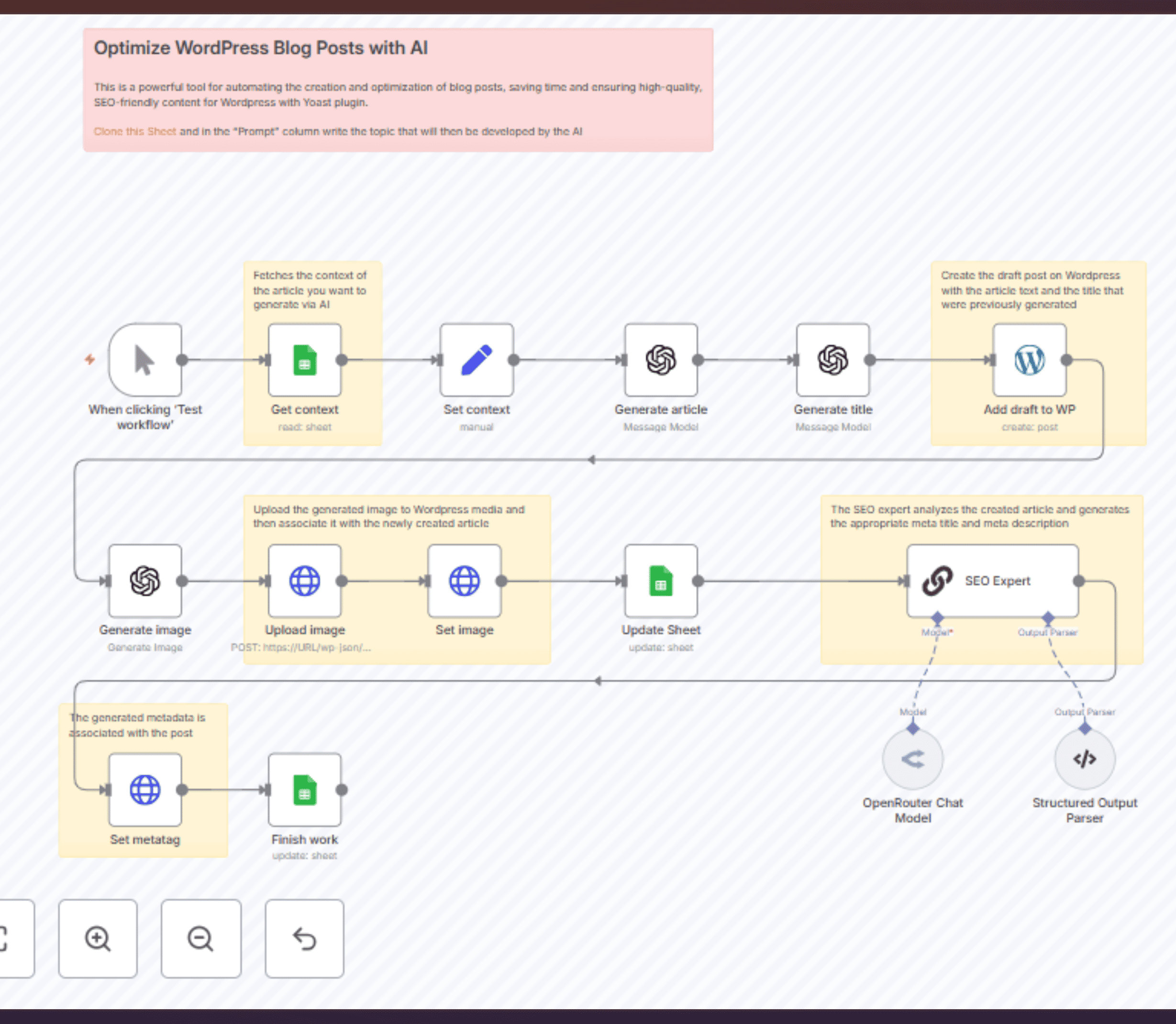
The workflow monitors a specific Google Drive folder for new documents, extracts the content using the Docs API, processes it through formatting nodes to add proper HTML structure, optimizes images through compression APIs, and pushes everything to WordPress via REST API. You can even set it up to automatically schedule posts based on your content calendar. What used to take 30 minutes per post now happens in seconds.
4. Technical SEO Monitoring
Technical SEO issues are like termites – by the time you notice them, the damage is done. Your n8n monitoring workflow runs daily crawls using Screaming Frog’s API or Sitebulb, checks Core Web Vitals through PageSpeed Insights, monitors your XML sitemap for errors, and tracks indexation status via Search Console.
When something breaks (and something always breaks), you get instant alerts. Not generic “something’s wrong” messages, but specific alerts like “404 error detected on high-traffic page /products/bestseller” with the exact steps to fix it. This alone has saved countless sites from traffic disasters.
5. Competitor Analysis System
Stop manually checking what your competitors are doing every week. Set up a workflow that monitors their content publishing frequency, tracks their ranking movements for your target keywords, analyzes their backlink acquisition rate, and even alerts you when they update important pages. The workflow aggregates data from multiple sources – Ahrefs for backlinks, SEMrush for rankings, and custom web scraping nodes for content updates.
The best part? It compiles everything into a weekly competitive intelligence report that lands in your inbox every Monday morning. You walk into the week knowing exactly what moves your competition made.
Building Your SEO Automation Infrastructure
Setting up n8n workflow automation for SEO isn’t about randomly connecting tools and hoping for the best. You need a deliberate infrastructure that scales with your needs and doesn’t break every time an API updates.
Setting Up Core Integrations
Start with the essentials. Don’t try to automate everything at once. Your core stack probably includes Google Search Console for performance data, your CMS (likely WordPress), a rank tracking tool, and maybe DataForSEO for scalable data access. Get these talking to each other first.
The secret is using n8n’s credentials system properly. Store your API keys securely, use OAuth where possible, and always set up proper error handling. Nothing kills automation faster than a workflow that fails silently because an API key expired.
Configuring API Connections
Here’s where people usually mess up: they treat API connections as set-and-forget. Wrong. APIs have rate limits, they have quirks, and they definitely have bad days. Your DataForSEO connection might allow 1000 requests per minute, but that doesn’t mean you should hammer it with 1000 requests.
Build in throttling using n8n’s Split in Batches node. Add retry logic with exponential backoff. Most importantly, log everything. When a workflow fails at 3 AM (and it will), you need those logs to understand what happened.
Workflow Template Development
Think of templates as your automation building blocks. Create modular workflows that handle specific tasks – keyword research, content optimization, technical audits – then combine them into larger processes. This modular approach means when Google changes their API (again), you only need to update one template instead of rebuilding everything.
A solid template includes error handling at every step, clear naming conventions that make sense six months later, documentation nodes explaining what each section does, and webhook endpoints for triggering from external sources.
Testing and Deployment Process
Never deploy a workflow straight to production. Never. Set up a staging environment where you can test with real data but without real consequences. Run your workflows with sample data first, then small batches, then gradually increase the load.
Monitor everything during the first week. Check that data flows correctly, APIs respond as expected, and outputs match your requirements. Only after a week of stable operation should you consider it production-ready.
Scaling SEO Operations with n8n
Small-scale automation is cute. But what happens when you’re managing 50 sites, tracking 10,000 keywords, and publishing 100 pieces of content weekly? That’s where n8n’s true power shines.
Enterprise Architecture Design
Enterprise n8n SEO automation guide starts with proper architecture. You need separate workflows for different site clusters, centralized data storage (think PostgreSQL or MongoDB), queue management for handling high-volume tasks, and proper monitoring and alerting systems.
Design your architecture with failure in mind. What happens if your main database goes down? How do workflows handle partial failures? Can you replay failed executions? These aren’t edge cases at scale – they’re Tuesday.
Performance Optimization Strategies
Performance at scale isn’t about making things faster. It’s about making things efficient. Use n8n’s workflow settings to control execution timeouts and memory limits. Implement caching for frequently accessed data – why pull the same keyword metrics 100 times when once per day is enough?
Split heavy workflows into smaller chunks using sub-workflows. Process data in parallel where possible. And always, always monitor resource usage. That workflow that worked great for 100 keywords might eat all your server’s RAM at 10,000.
Multi-Site Management Automation
Managing multiple sites without automation is like juggling flaming torches while riding a unicycle. Eventually, something’s getting dropped. Your multi-site workflow should handle centralized keyword tracking across all properties, automated content distribution based on site themes, consolidated reporting that actually makes sense, and cross-site internal linking opportunities.
The trick is maintaining site individuality while leveraging shared resources. Each site might have unique content needs, but they can all share the same technical monitoring infrastructure.
Team Collaboration Features
SEO automation isn’t a solo sport at scale. Your team needs visibility into what’s running, what’s failing, and what needs attention. Set up Slack or Microsoft Teams integrations for real-time alerts, create shared dashboards showing workflow status, implement approval chains for sensitive operations, and maintain audit logs for compliance.
Remember: automation should enhance team productivity, not create a black box that only one person understands.
Maximizing ROI Through n8n SEO Automation
After implementing comprehensive SEO automation with n8n, most teams see their effective capacity triple. Not because they’re working harder, but because they’ve eliminated the mindless repetition that consumed 70% of their day. Tasks that took hours now complete in minutes. Reports that required half a day to compile generate automatically. Technical issues that could tank rankings for weeks get caught and fixed within hours.
The real ROI isn’t just time saved – it’s opportunities captured. When your automation spots a trending keyword before competitors, when it identifies and fixes a technical issue before Google penalizes you, when it scales your content production without sacrificing quality. That’s where the magic happens.
But here’s the thing: automation isn’t a magic wand. It amplifies what you put into it. Build thoughtful, well-tested workflows and you’ll have a competitive advantage that compounds daily. Rush through setup, ignore best practices, skip documentation? You’ll have a brittle mess that breaks constantly and nobody can fix.
The choice is yours. Keep doing SEO the old way and watch as automated competitors eat your lunch. Or embrace n8n automation and join the ranks of SEO teams actually enjoying their work while delivering better results. Sounds like an easy decision, right?
FAQs
What are the essential DataForSEO API endpoints for n8n workflows?
Focus on five core endpoints that deliver maximum value: the SERP API for real-time ranking data, Keywords Data API for search volume and difficulty metrics, Backlink API for link analysis, On-Page API for technical audits, and DataForSEO Labs for competitive research. Start with Keywords Data and SERP – they’ll cover 80% of your automation needs. The others can wait until you’ve mastered the basics.
How can I automate content publishing from Google Sheets to WordPress?
Set up a Google Sheets trigger node that monitors specific columns for new entries, use the Sheets node to read content data including title, body, meta description, and categories. Transform the data using n8n’s Set node to match WordPress’s expected format, then push everything through the WordPress node with proper authentication. Pro tip: add a status column in your sheet that updates to “Published” after successful posting to avoid duplicates.
What are the best practices for error handling in n8n SEO workflows?
Never let workflows fail silently. Implement try-catch patterns using the Error Trigger node, add detailed logging at each critical step, set up email or Slack alerts for failures, and always include retry logic with exponential backoff for API calls. Store error details in a database for pattern analysis. Most importantly, build separate error handling workflows that can diagnose and sometimes auto-resolve common issues.
How do I monitor multiple websites using n8n automation?
Create a master workflow that loops through a list of sites stored in a database or Google Sheet. For each site, trigger sub-workflows handling specific monitoring tasks – uptime checks, Core Web Vitals, indexation status, and ranking tracking. Aggregate results into a central dashboard. Use conditional logic to apply different monitoring frequencies based on site importance. Critical sites might get checked hourly while others run daily.
Can n8n handle enterprise-level SEO operations at scale?
Absolutely, but you need proper infrastructure. Run n8n in queue mode with Redis for handling high-volume operations, use external databases for data storage instead of n8n’s internal SQLite, implement load balancing across multiple n8n instances, and set up proper monitoring with tools like Datadog or New Relic. We’ve seen setups handling millions of keywords and hundreds of sites. The platform can scale – the question is whether your

Ridam Khare is an SEO strategist with 7+ years of experience specializing in AI-driven content creation. He helps businesses scale high-quality blogs that rank, engage, and convert.