

Most e-commerce guides will tell you duplicate content is just an SEO problem. That’s dangerously incomplete. Duplicate content on your online store isn’t just confusing Google – it’s actively bleeding your marketing budget and sabotaging conversions. Every duplicate product page splits your link equity, dilutes your crawl budget, and creates a maze where customers abandon their carts in frustration.
What is Duplicate Content
Duplicate content happens when identical or nearly identical content appears on multiple URLs across your site. For e-commerce stores, this is like having three different salespeople all trying to sell the same product to the same customer at the same time. Chaos.
Think of it this way: if you sell a blue t-shirt that shows up at /blue-shirt, /products/blue-shirt, and /clothing/tops/blue-shirt, you’ve just created three competing pages. Google sees all three and has to pick which one to rank. Often, it picks wrong – or worse, doesn’t pick any of them.
Why Does Duplicate Content Matter for SEO
Here’s what actually happens when Google finds ecommerce duplicate content on your site. First, your crawl budget gets torched – instead of discovering new products, Googlebot wastes time crawling the same content repeatedly. Second, your link equity gets scattered across multiple URLs instead of concentrating on one powerful page. You might have 50 backlinks total, but if they’re split across 5 duplicate pages, each one only gets 10.
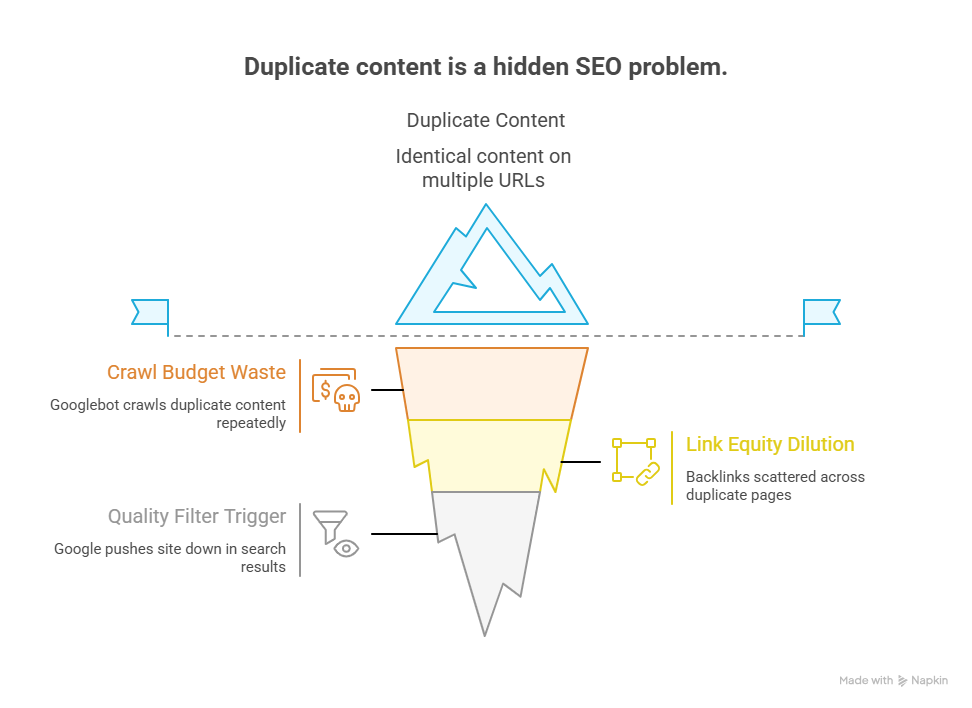
The real kicker? Duplicate content can trigger Google’s quality filters. Your site doesn’t get penalized exactly, but it gets pushed down in favor of sites that have their content organized properly.
How can I find duplicate content on my website?
Start with the obvious culprit: your site search. Type “site:yourstore.com ‘exact product name'” into Google and watch how many versions pop up. Most store owners are shocked to find 3-5 variations of every product page.
For a deeper dive, tools like Screaming Frog will crawl your entire site and flag duplicate title tags, meta descriptions, and content. But here’s the quick manual check that catches 80% of issues:
-
Check if adding ?sort=price to your URLs creates a “new” page
-
Look for /print/ versions of your product pages
-
Search for product SKUs – they often appear on multiple pages
-
Check if your mobile site uses m.yourstore.com (that’s duplicate city)
Duplicate vs Similar vs Thin Content
Not all content problems are created equal. Duplicate content means exact or near-exact copies – same product description on 10 color variations. Similar content shares themes but has unique elements – think different shoe sizes with slightly tweaked descriptions. Thin content is just weak – a 50-word product description that adds nothing useful.
Here’s the hierarchy of what to fix first: exact duplicates cause the most damage, similar content dilutes your authority, and thin content just wastes everyone’s time. Fix them in that order.
Step-by-Step Solutions to Fix Ecommerce Duplicate Content Issues
Let’s get into the actual fixes. These aren’t theoretical – they’re battle-tested solutions that have rescued countless ecommerce sites from duplicate content hell.
1. Implement Canonical URLs for Product Variations
Canonical tags are your first line of defense against duplicate content issue in ecommerce. They tell Google, “This is the main version, ignore the others.” Every color and size variation should point back to your main product page with a canonical tag.
Here’s exactly how to use canonical URLs in ecommerce:
<link rel="canonical" href="https://yourstore.com/main-product-page" />
Place this in the head section of every variation page. Takes five minutes to implement. Saves months of SEO headaches.
2. Set Up 301 Redirects for Duplicate Pages
Found old URLs that shouldn’t exist anymore? Don’t just delete them – that’s throwing away any SEO value they’ve built. Instead, 301 redirect them to the correct page. This passes roughly 90% of the link equity to your target page.
Common redirect scenarios:
-
Old product URLs → Current product page
-
Deleted products → Parent category page
-
HTTP versions → HTTPS versions
-
Non-www → www (or vice versa, pick one and stick with it)
3. Configure URL Parameters in Google Search Console
Your URL parameters (like ?color=blue&size=large) create infinite duplicate variations. Google Search Console lets you tell Google exactly how to handle these parameters. Log in, go to URL Parameters tool, and set rules for each parameter.
Tell Google to ignore parameters that don’t change content (like session IDs) and crawl only representative URLs for parameters that do (like sorting). This alone can cut your duplicate content by 40%.
4. Fix Pagination Duplicate Content
Category pages with pagination (/category/page/2, /category/page/3) create massive duplication. The old rel=”prev” and rel=”next” tags are dead. Now you need a different approach.
Best practice: make each paginated page unique with its own title and description. “Men’s Shoes – Page 2 of 5” beats having 5 pages all titled “Men’s Shoes.” Also, implement view-all pages where possible and canonical paginated pages back to them.
5. Consolidate Similar Product Descriptions
Stop copying manufacturer descriptions verbatim. Every other retailer is doing the same thing. Write unique descriptions for your top 20% of products (the ones that actually make you money) and use a template with variables for the rest.
Good template example: “[Product Name] features [Key Feature 1] and [Key Feature 2], perfect for [Use Case]. [Unique Selling Point]. Available in [Variations].”
6. Handle Session IDs and Tracking Parameters
Session IDs in URLs (?sessionid=abc123) create a new URL for every visitor. That’s potentially millions of duplicate pages. Move session tracking to cookies immediately. Can’t do that? At minimum, use canonical tags to point all session URLs back to the clean URL.
For tracking parameters (utm_source, etc.), configure your server to ignore them when generating page content. Google sees them as different URLs but your server serves the same content.
7. Manage Category and Filter Pages
Filtered navigation creates exponential duplicates. Just 3 filters with 3 options each creates 27 possible URL combinations. Your solution depends on search volume:
|
Filter Type |
Search Volume |
Solution |
|---|---|---|
|
Brand + Category |
High |
Create static pages, optimize fully |
|
Color variations |
Medium |
Use canonical to main category |
|
Price ranges |
Low |
Noindex, follow |
|
Sort options |
None |
Block in robots.txt |
Common Ecommerce Duplicate Content Scenarios and Their Fixes
Some duplicate content patterns show up in almost every ecommerce site. Let’s tackle the big four.
Product Variants Creating Multiple URLs
The classic nightmare: one product, six colors, three sizes, and suddenly you have 18 URLs fighting each other. Here’s what drives me crazy – most platforms create these duplicates by default and nobody tells you until your rankings tank.
The fix: pick one URL as your canonical version (usually the most popular variant) and point all others to it. Then use JavaScript to change variants without changing URLs. Customer gets the same experience, Google sees one page.
Printer-Friendly Pages and Mobile Versions
Remember printer-friendly pages? They’re still lurking on older sites, creating duplicates of every product. And mobile versions on subdomains (m.yourstore.com) double your entire site.
Quick fixes: noindex all print versions or better yet, use CSS print stylesheets instead. For mobile, implement responsive design and redirect m.dot URLs to your main domain. Google’s been pushing this since 2015. No excuses.
Syndicated Product Descriptions from Manufacturers
Using manufacturer descriptions seems efficient until you realize 50 other stores have the exact same content. Google picks one to rank and ignores the rest. Guess what? The biggest store usually wins.
Smart approach: Keep manufacturer specs in a separate tab or accordion (Google gives these less weight) and write your own main description. Focus on use cases, benefits, and comparisons your customers actually care about. Takes more work? Yes. Gets you ranked? Also yes.
International and Multi-Language Duplicates
Running stores in multiple countries? Without proper hreflang tags, Google sees yourstore.com/us/product and yourstore.co.uk/product as duplicates. Even worse with languages – yourstore.com/en/ and yourstore.com/es/ fighting for the same keywords.
Implement hreflang tags to tell Google which version to show where:
<link rel="alternate" hreflang="en-us" href="https://yourstore.com/us/product" /><link rel="alternate" hreflang="en-gb" href="https://yourstore.co.uk/product" />
Conclusion
Fixing ecommerce duplicate content isn’t a one-and-done project. New products create new duplicates, platform updates introduce new parameters, and seasonal campaigns spawn tracking URLs. But here’s the thing – you don’t need perfection. Even fixing your top 20% of duplicate content issues will noticeably boost your rankings and conversions.
Start with canonical tags on your product variations (biggest impact, easiest fix), then move to 301 redirects for old URLs. Set up Google Search Console parameter handling this week. These three fixes alone will eliminate most of your duplicate content drama.
Want to know if it’s working? Watch your indexed pages count in Google Search Console. It should drop as duplicates get consolidated. That’s not bad – that’s Google finally understanding your site structure. Your organic traffic should start climbing within 4-6 weeks as Google recrawls and reindexes your cleaned-up pages.
Frequently Asked Questions
Does duplicate content hurt my ecommerce site’s SEO rankings?
Duplicate content doesn’t trigger a penalty, but it absolutely hurts rankings. Google has to choose which version to rank and often picks none of them. Plus, your link equity gets split across duplicates instead of powering one strong page. Fix duplicates and watch your rankings improve within weeks.
How do I know if my ecommerce site has duplicate content issues?
Quick test: Google “site:yourstore.com ‘exact product name'” and see how many results appear. More than one? You’ve got duplicates. For the full picture, use Screaming Frog or Sitebulb to crawl your site and flag duplicate titles and content. Most stores discover hundreds of duplicates they didn’t know existed.
Should I use canonical tags or 301 redirects for duplicate product pages?
Use 301 redirects when the duplicate page shouldn’t exist at all (old URLs, deleted products). Use canonical tags when both pages need to exist but you want to consolidate SEO value (product variations, filtered categories). Redirects are stronger but canonicals are more flexible.
Can I use the same product descriptions as my suppliers?
You can, but you’ll never rank well. Hundreds of sites use those same descriptions. Write unique content for your bestsellers at minimum. Keep manufacturer specs but add your own introduction, benefits, and use cases. That’s what actually converts browsers into buyers anyway.
How long does it take Google to recognize canonical URL fixes?
Google typically processes canonical tags within 2-4 weeks for frequently crawled pages, longer for deeper pages. You’ll see the impact in Search Console’s Index Coverage report first. Rankings usually improve 4-8 weeks after Google accepts your canonicals. Speed it up by submitting updated sitemaps and requesting crawls for critical pages.

Ridam Khare is an SEO strategist with 7+ years of experience specializing in AI-driven content creation. He helps businesses scale high-quality blogs that rank, engage, and convert.



