

Most SEO guides will tell you to obsess over keywords and backlinks while completely ignoring the silent killer of search rankings – crawl budget. Here’s the kicker: Google might only be seeing 20% of your best content. The rest sits in digital purgatory, discovered but never indexed, invisible to searchers who need what you’re offering.
What is crawl budget?
Think of crawl budget as Google’s daily allowance for exploring your site. Every website gets a certain number of pages that Googlebot will crawl each day – that’s your budget. For a small blog with 50 pages, this might not matter much. But once you hit a few hundred pages, or if you’re running an e-commerce site with thousands of products, you’re playing a different game entirely.
The math is brutally simple. If Google allocates 100 crawls per day to your site and you publish 200 new pages, half your content waits in line. Some of it never gets seen at all.
Why should you care about crawl budget?
Picture this scenario: You spend three weeks crafting the perfect product page, optimizing every meta tag and internal link. You hit publish at 9 AM on a Tuesday, expecting traffic to start flowing. Six months later, that page still shows as “Discovered – currently not indexed” in Search Console. Sound familiar?
That’s crawl budget wastage in action. Your site might be hemorrhaging crawl budget on:
-
404 error pages that Googlebot keeps checking
-
Infinite URL parameters from your filtering system
-
Duplicate content from printer-friendly versions
-
Old blog posts from 2015 that nobody reads anymore
Fix these issues and watch your important pages get indexed faster. It’s that straightforward.
How to Check Your Crawl Budget in Google Search Console
Let me save you the frustration of clicking through seventeen different Search Console reports trying to find this data. The crawl stats are buried deeper than you’d expect, but once you know where to look, monitoring becomes a five-minute weekly task.
1. Accessing the Crawl Stats Report
Navigate to Settings in the left sidebar (not Performance, not Coverage – Settings). Scroll down until you see “Crawl stats” under the Advanced section. Click “Open Report” and you’re in. Google doesn’t make this obvious because honestly, most site owners never need to look here.
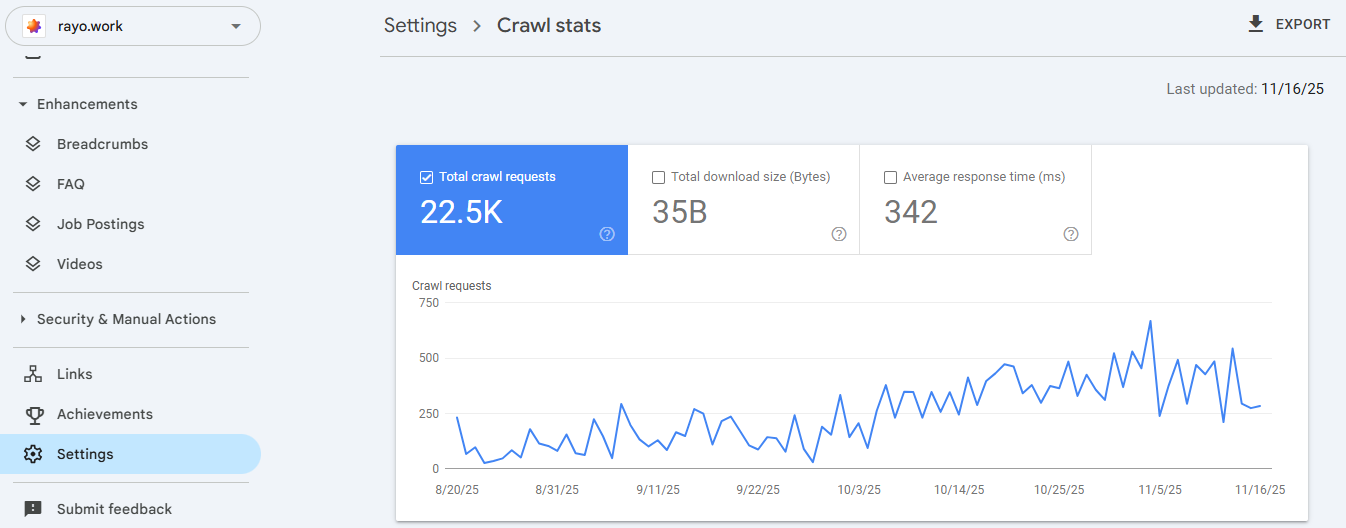
2. Understanding Total Crawl Requests
The first graph shows your daily crawl requests over the last 90 days. This is the heartbeat of your crawl budget. A healthy site shows consistent crawling with occasional spikes when you publish new content. If you’re seeing wild fluctuations or a sudden drop, something’s wrong.
Pay attention to the average line. That number – whether it’s 50 or 5,000 crawls per day – is essentially your working crawl budget.
3. Calculating Your Daily Crawl Budget
Here’s a quick formula that actually works:
|
Metric |
How to Calculate |
|---|---|
|
Daily Crawl Budget |
Average daily crawls (from the report) |
|
Crawl Efficiency |
(Important pages crawled / Total crawls) × 100 |
|
Waste Percentage |
(404s + Duplicates + Low-value pages) / Total crawls |
If your waste percentage exceeds 30%, you’re literally burning through your crawl budget on pages that don’t matter.
4. Analyzing Response Time and Download Size
Below the main graph, you’ll find average response time and download size metrics. Google crawls faster sites more frequently – it’s not being nice, it’s being efficient. If your server takes 800ms to respond instead of 200ms, you just cut your effective crawl budget by 75%. The math is brutal but fair.
Keep response times under 300ms and page sizes under 500KB for optimal crawling. Anything higher and you’re leaving crawl budget on the table.
Essential Tools for Monitoring Crawl Budget
Search Console gives you the basics, but if you’re serious about crawl budget optimization, you need proper tools. Let’s cut through the marketing fluff and focus on what actually works.
Server Log Analysis Tools
Your server logs are the single source of truth for crawl activity. They show every bot visit, not just the sanitized version Google shares. Screaming Frog Log File Analyser (yes, British spelling) is the industry standard here. Upload your logs and instantly see which bots are hitting which pages and how often.
The free version handles 1,000 log entries. The paid version? Unlimited. Worth every penny if you’re managing sites over 10,000 pages.
Third-Party SEO Audit Platforms
Ahrefs and Semrush both offer crawl tracking, but here’s the truth – they’re estimating based on their own crawls, not Google’s actual behavior. Still useful for spotting issues like orphan pages and redirect chains that waste crawl budget. Just don’t treat their numbers as gospel.
The real value comes from their site audit features. They’ll flag the crawl budget killers automatically: redirect chains, canonical issues, duplicate content. Fix what they find and your actual crawl budget improves.
Specialized Crawl Budget Analyzers
For enterprise sites or anyone managing millions of URLs, specialized tools like Botify or Oncrawl become essential. They combine log file analysis with their own crawl data and Search Console API access to paint the complete picture. Yes, they’re expensive (think $1,000+ monthly). No, you probably don’t need them unless you’re managing massive sites.
Most sites can get by with free Search Console data and occasional log file checks. Don’t overthink this.
Mastering Crawl Budget Monitoring
After diving deep into monitoring crawl budget, here’s what matters: consistency beats perfection. Check your crawl stats weekly, not daily. Look for trends, not individual spikes. Focus on removing waste before trying to increase your budget.
The sites that win at crawl budget SEO aren’t the ones with the fanciest tools. They’re the ones that regularly clean up their technical debt and make every crawl count. Start with Search Console, graduate to log files when you need more detail, and only invest in premium tools when you’re managing enterprise-level complexity.
Remember – Google’s crawl budget isn’t infinite, and neither is your time. Focus on what moves the needle: faster server response, cleaner site architecture, and ruthless elimination of crawl waste. Everything else is optimization

Ridam Khare is an SEO strategist with 7+ years of experience specializing in AI-driven content creation. He helps businesses scale high-quality blogs that rank, engage, and convert.



