

Creating a search engine optimization report is essential for tracking your website’s performance and making data-driven decisions. Whether you’re managing SEO for clients or your own business, a well-structured report helps demonstrate progress, identify problems, and prioritize future work. Let’s explore how to create a comprehensive SEO report that delivers actionable insights.
Gather Key SEO Performance Metrics
Before you can analyze your website’s performance, you need to collect the right data. The foundation of any search engine optimization report is solid metrics that tell the complete story of your organic presence.
Track changes in organic traffic
Organic traffic is the most direct indicator of SEO success. In your report, include:
- Total organic sessions and users over time
- Month-over-month traffic changes (with percentages)
- Year-over-year comparisons to account for seasonality
- Top landing pages from organic search
- New vs. returning visitor ratios
Google Analytics is your primary tool here, but many SEO platforms now offer their own traffic analysis features. Look for correlations between traffic changes and specific SEO activities to determine what’s working.
Analyze Keyword Rankings and Trends
Keyword performance reveals how visible your site is for targeted search terms. Your search engine optimization report should track:
- Position changes for primary target keywords
- Overall visibility score across your keyword universe
- Distribution of rankings (how many terms in top 3, top 10, etc.)
- New ranking opportunities discovered during the reporting period
- Competitor position changes for the same terms
Tools like SEMrush, Ahrefs, and Moz provide this data. Pay special attention to keywords with high conversion potential rather than just high search volume.
Measure bounce rate and session time
User behaviour metrics help you understand if your content meets visitor expectations. Include these engagement metrics in your report:
| Metric | What It Indicates |
|---|---|
| Bounce Rate | Single-page sessions where users leave without further interaction |
| Average Session Duration | How long visitors spend engaging with your content |
| Pages Per Session | How effectively does your site encourage further exploration |
| Scroll Depth | How effectively your site encourage further exploration |
Compare these metrics against industry benchmarks and your own historical data to identify content that needs improvement.
Check indexation and crawl stats via GSC
Google Search Console (GSC) provides crucial information about how search engines interact with your site:
- Total pages in index vs. pages submitted
- Crawl errors and coverage issues
- Mobile usability problems
- Core Web Vitals performance
- Rich result status and errors
Include a summary of these technical indicators in your search engine optimization report to explain potential ranking or traffic changes.
Run a Comprehensive Website SEO Analysis
While performance metrics show what’s happening, a technical analysis explains why. Your SEO report should include findings from a regular site audit.
Scan technical SEO issues
Technical problems can undermine even the best content. Document these aspects:
- Site speed metrics (especially Core Web Vitals)
- Mobile responsiveness issues
- Crawlability problems (robots.txt, sitemap issues)
- Duplicate content concerns
- Broken links and 404 errors
- HTTPS implementation status
Tools like Screaming Frog, Sitebulb, or Semrush’s Site Audit feature can help identify these issues. Track them over time to show progress in your search engine optimization report.
Evaluate on-page SEO elements
On-page optimization directly impacts rankings and user experience. Analyze:
- Title tag and meta description optimization
- Heading structure and keyword usage
- Content quality, depth, and relevance
- Image optimization (alt text, file size)
- Internal linking patterns
Consider creating a scoring system to track on-page improvements consistently between reporting periods.
Review backlinks and domain authority
Off-site factors remain crucial for search visibility.
Don’t build links, build relationships. — Rand Fishkin
Include in your search engine optimization report:
- Total backlink count and changes over time
- New and lost backlinks during the reporting period
- Link quality metrics (spam score, domain authority)
- Anchor text distribution
- Competitor backlink comparison
Use tools like Ahrefs, Majestic, or Moz to gather this data and identify both problematic links and new link-building opportunities.
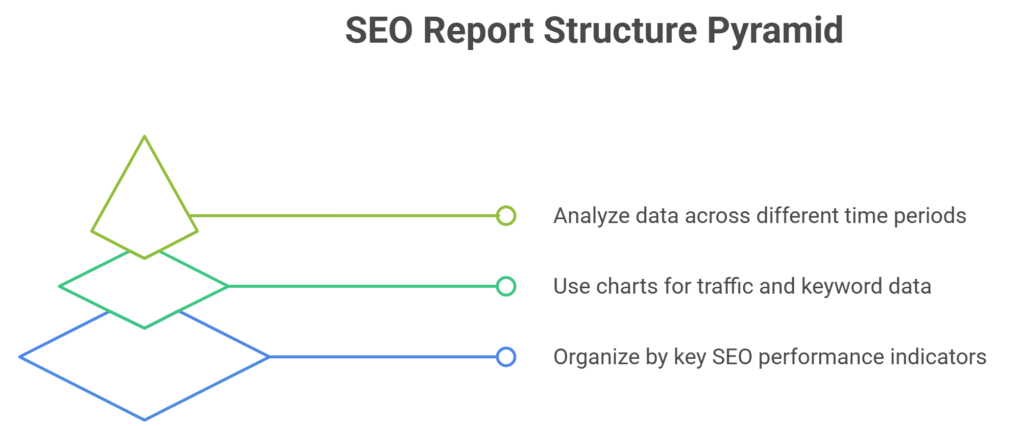
Organize and Build the SEO Report Structure
With your data collected, it’s time to organize it in a way that tells a clear story and drives action.
Create sections for each SEO KPI
A well-structured search engine optimization report should include these key sections:
- Executive Summary: High-level performance overview and key wins
- Organic Traffic Analysis: Detailed traffic metrics and trends
- Keyword Performance: Ranking changes and visibility metrics
- Technical Health: Site audit findings and improvements
- Content Performance: Top-performing and underperforming pages
- Backlink Profile: Off-site factors and authority metrics
- Recommendations: Prioritized action items based on findings
This logical flow helps stakeholders understand the complete picture of your SEO performance.
Use visuals for traffic and keyword data
Visual elements make complex data more accessible in your search engine optimization report:
- Line graphs showing traffic trends over time
- Heat maps illustrating keyword position changes
- Bar charts comparing performance across segments
- Pie charts showing traffic sources
- Scatter plots mapping keywords by volume and position
Tools like Google Data Studio, Looker Studio, or PowerBI can help create compelling visualizations that make your data instantly understandable.
Add filters and comparisons across time
Context matters in SEO reporting. Include these comparative elements:
- Month-over-month changes (with percentage)
- Year-over-year comparisons to account for seasonality
- Competitor benchmarking, when available
- Segment filters (device type, location, etc.)
- Pre/post implementation comparisons for major changes
These comparisons help distinguish between normal fluctuations and meaningful trends in your search engine optimization report.
Wrap Up with Actionable Insights and Next Steps
The most valuable part of any SEO report isn’t the data itself but the conclusions and recommendations you draw from it. Your conclusion should:
- Summarize key findings in simple, non-technical language
- Connect SEO performance to business outcomes
- Provide clear, prioritized recommendations
- Outline specific next steps with estimated impact
- Set realistic expectations for implementation and results
Remember that the primary purpose of your SEO report is to drive action. Focus on insights that lead to concrete improvements rather than overwhelming readers with data.
Frequently Asked Questions
What tools help create an SEO report quickly?
Several tools can streamline your search engine optimization report creation: Google Analytics and Search Console provide essential performance data; SEMrush, Ahrefs, and Moz offer comprehensive keyword and backlink analysis; Screaming Frog helps with technical audits; and Google Data Studio or Looker Studio can combine all data sources into automated, visual reports. Many agencies use combinations of these tools with custom API connections for efficient reporting.
How often should you update your search engine optimization report?
Monthly reporting is the industry standard for most businesses, striking a balance between timely insights and allowing enough time to see meaningful trends. However, e-commerce sites or businesses in competitive niches might benefit from bi-weekly updates, while established sites in stable industries might only need quarterly in-depth reports supplemented with monthly highlights.
What are the must-have SEO performance metrics in a report?
Every search engine optimization report should include: organic sessions and users, organic conversion rate, keyword rankings for primary terms, click-through rates from search results, and page speed metrics. Beyond these fundamentals, include metrics aligned with specific business goals, such as local visibility metrics for local businesses or featured snippet appearances for content-focused sites.
Is website SEO analysis important for every SEO report?
Yes, website SEO analysis is crucial for every search engine optimization report, though the depth may vary month to month. While a comprehensive technical audit might not be necessary monthly, always include updates on previously identified issues and new problems that have emerged. This technical context helps explain performance changes and justifies recommended actions.
How do I present organic traffic insights in an SEO report?
Present organic traffic insights with both high-level summaries and segmented details. Start with overall trend charts showing sessions and conversions, then break down traffic by landing pages, queries, devices, and user demographics. Always include comparative data (month-over-month and year-over-year) to provide context. Visual elements like sparklines or small trend indicators next to key metrics can quickly communicate directional changes in your search engine optimization report.

Ridam Khare is an SEO strategist with 7+ years of experience specializing in AI-driven content creation. He helps businesses scale high-quality blogs that rank, engage, and convert.



