

Running a site audit might sound technical and intimidating, but it’s actually one of the smartest moves you can make for your website’s health. In today’s digital world, your website needs regular check-ups just like your car or your health. With search engines constantly updating their algorithms and user expectations evolving, knowing how to do a site audit properly gives you a competitive edge. Let’s dive into a comprehensive site audit process that will help you identify issues, capitalize on opportunities, and keep your website performing at its best in 2025.
What is a website audit?
A website audit is a complete examination of all factors that affect your site’s visibility in search engines and its usability for visitors. It’s like getting an X-ray of your entire online presence, revealing strengths, weaknesses, and areas needing attention. A thorough audit covers everything from technical infrastructure to content quality and user experience.
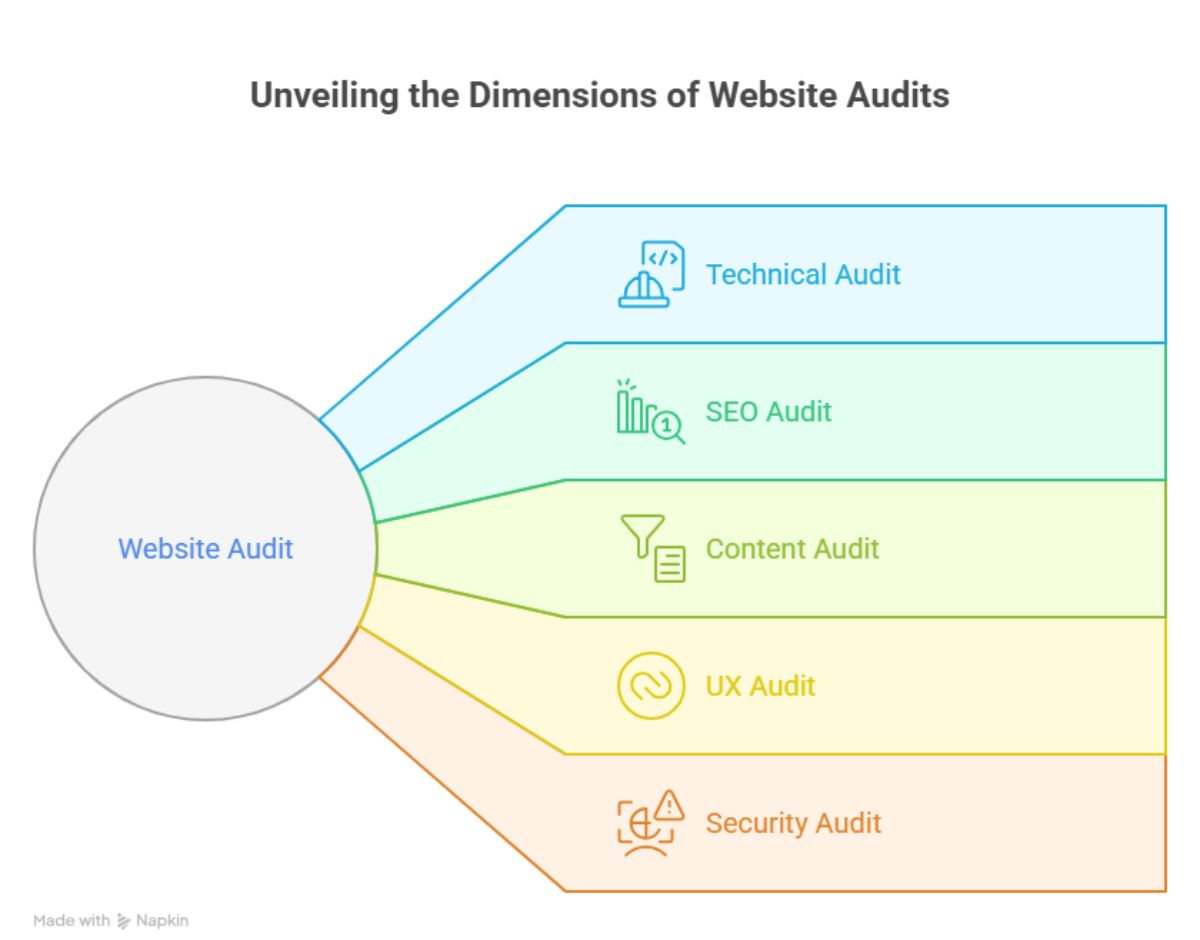
Types of website audits
Website audits typically fall into several categories:
-
Technical audit – Examines server performance, site architecture, and code issues
-
SEO audit – Focuses on search visibility factors like keywords, backlinks, and metadata
-
Content audit – Evaluates quality, relevance, and performance of your content
-
UX audit – Analyzes the user journey, navigation, and conversion paths
-
Security audit – Identifies vulnerabilities and compliance issues
Why run a website audit?
Running regular website audits delivers multiple benefits:
-
Catch and fix technical problems before they hurt your rankings
-
Uncover hidden SEO opportunities to boost visibility
-
Improve user experience, leading to better engagement and higher conversions
-
Stay ahead of competitors by continuously optimizing your site
-
Build a stronger foundation for future marketing efforts
-
Identify content gaps and create a strategic content plan
Start with a website audit checklist
A systematic approach ensures nothing falls through the cracks during your audit. Let’s break down the essential components to examine first.
1. Check for broken links
Broken links frustrate users and damage your SEO. Use tools like Screaming Frog or Ahrefs to identify 404 errors across your site. Look for:
-
Internal links pointing to non-existent pages
-
External links to websites that have moved or shut down
-
Navigation menu links that lead nowhere
-
Links in older content that haven’t been updated
For each broken link, decide whether to fix, redirect, or remove it based on its importance to users and SEO.
2. Review URL structure for SEO
Your URLs should be clean, logical, and descriptive. Check that they:
-
Follow a consistent pattern and hierarchy
-
Include relevant keywords naturally
-
Use hyphens (not underscores) to separate words
-
Avoid unnecessary parameters, numbers, or special characters
-
Stay relatively short (under 60 characters when possible)
3. Test responsiveness on devices
With mobile traffic dominating many industries, responsiveness is non-negotiable. Verify your site by:
-
Testing on actual devices (not just browser emulators)
-
Checking critical functions work on touchscreens
-
Confirming forms are usable on small screens
-
Ensuring text is readable without zooming
-
Using Google’s Mobile-Friendly Test tool
4. Verify HTTPS and SSL setup
Security builds trust with users and search engines. Make sure:
-
All pages load via HTTPS (not HTTP)
-
Your SSL certificate is valid and not expired
-
No mixed content warnings appear (secure and insecure elements)
-
Proper redirects from HTTP to HTTPS versions exist
-
Security headers are correctly implemented
5. Check crawlability via robots.txt
Your robots.txt file tells search engines which parts of your site they can access. Review it to ensure:
-
You’re not accidentally blocking important content
-
Search engines can access all public pages
-
Private or duplicate areas are properly blocked
-
Your sitemap location is correctly specified
-
Development or staging environments are protected
6. Look for orphaned pages
Orphaned pages exist on your website but have no internal links pointing to them. These pages are hard for both users and search engines to discover. Find them by:
-
Cross-referencing your sitemap with your internal link structure
-
Looking for traffic to pages not in your main navigation
-
Checking Google Analytics for pages with few entrances
-
Using crawling tools to identify unlinked content
Run a technical site audit properly
The technical foundation of your website directly impacts both user experience and search visibility. Let’s dive deeper into this critical area.
1. Fix crawl errors in Google Search Console
Google Search Console provides invaluable insights into how search engines see your site. Focus on:
-
Server errors (5xx) that indicate hosting problems
-
Not found errors (4xx) that frustrate users and waste crawl budget
-
Redirect chains that slow down crawling and indexing
-
Mobile usability issues that affect rankings
-
Coverage issues preventing page indexing
2. Detect and fix duplicate content
Duplicate content confuses search engines and dilutes ranking potential. Look for:
-
Similar pages with slightly different URLs (www vs non-www, trailing slashes)
-
Product pages accessible through multiple categories
-
Pagination issues creating duplicate versions
-
Session IDs or parameters creating duplicate versions
Use canonical tags, 301 redirects, or parameter handling to resolve these issues.
3. Audit site speed and load times
Speed directly impacts both user experience and search rankings. Analyze:
-
Core Web Vitals metrics in Google Search Console
-
Page load time on mobile and desktop
-
First Contentful Paint and Largest Contentful Paint
-
Time to Interactive and First Input Delay
-
Cumulative Layout Shift that frustrates users
4. Check JavaScript rendering issues
Modern websites rely heavily on JavaScript, which can create crawling challenges. Verify:
-
Content visibility with JavaScript disabled
-
How search engines render your JavaScript content
-
Proper implementation of dynamic rendering if needed
-
JavaScript errors in the browser console
-
Server-side rendering for critical content
5. Validate sitemap and submit it
A properly structured XML sitemap helps search engines discover and understand your content. Ensure it:
-
Contains only canonical, indexable URLs
-
Excludes redirected or error pages
-
Updates automatically when content changes
-
Follows proper XML formatting
-
Is submitted to Google Search Console and Bing Webmaster Tools
Evaluate SEO and on-page essentials
On-page optimization remains fundamental to search visibility. Focus on these key elements during your audit.
Audit metadata (title, meta descriptions)
These elements influence click-through rates from search results. Check that:
-
Every page has a unique, compelling title under 60 characters
-
Meta descriptions are persuasive and under 155 characters
-
Both elements contain relevant keywords naturally
-
No duplicate titles or descriptions exist across the site
-
Titles follow a consistent brand format
Ensure one H1 per page
Proper header structure creates content hierarchy for both users and search engines:
-
Verify each page has exactly one H1 tag
-
Make sure the H1 accurately reflects the page content
-
Check that H1s contain relevant keywords
-
Ensure subsequent headers (H2-H6) follow a logical hierarchy
-
Avoid skipping header levels in your structure
Assess keyword targeting and density
Effective keyword usage remains crucial for SEO success:
-
Verify primary keywords appear in important places (title, H1, first paragraph)
-
Check for natural keyword distribution throughout content
-
Maintain appropriate keyword density (1-1.5%) without stuffing
-
Include related terms and semantic variations
-
Ensure content satisfies the search intent behind target keywords
Check image alt attributes
Properly optimized images improve both accessibility and SEO:
-
Verify all non-decorative images have descriptive alt text
-
Include relevant keywords in alt text when appropriate
-
Use descriptive, keyword-rich file names
-
Ensure images are properly sized and compressed
-
Implement lazy loading for better page speed
Internal linking gaps and flow
Strategic internal linking distributes authority and guides users through your site:
-
Identify high-value pages with too few internal links
-
Check that important pages receive links from relevant content
-
Use descriptive anchor text that includes target keywords
-
Create logical topic clusters linking related content
-
Avoid excessive links that might appear unnatural
Wrap up your site audit using this checklist
Now that you’ve completed your audit, prioritize issues based on their impact. Start with critical technical problems that affect crawling and indexing, then move to on-page SEO issues, and finally address content improvements. Document your findings and create a roadmap with clear timelines for implementation.
Remember that a site audit isn’t a one-time task but an ongoing process. By regularly checking your site against this checklist, you’ll stay ahead of issues, capitalize on opportunities, and keep your website performing at its best. The digital landscape is always changing, and a proactive approach to site audits will help you maintain your competitive edge in 2025 and beyond.
How often should I do a site audit?
For most websites, conducting a complete audit quarterly makes sense. However, certain elements deserve more frequent checks: review Google Search Console weekly for critical errors, monitor site speed monthly, and analyze core metrics in your analytics tool at least monthly. After major site changes or updates, always run a focused audit to catch any new issues. Larger sites or those in highly competitive industries might benefit from more frequent comprehensive audits, while smaller sites with minimal changes might manage with semi-annual reviews.
What tools help run a technical site audit?
Several powerful tools can streamline your technical audit process:
-
Google Search Console for indexing issues and performance data
-
Screaming Frog SEO Spider for comprehensive crawling
-
Semrush or Ahrefs for competitive analysis and technical insights
-
GTmetrix or PageSpeed Insights for performance testing
-
Lighthouse for web quality and accessibility checks
-
Sitebulb for visual crawl diagrams and technical reporting
Most professionals use a combination of 2-3 specialized tools to get complete coverage.
Is the website audit checklist different for eCommerce sites?
Yes! eCommerce sites need additional audit elements beyond standard websites:
-
Product schema markup implementation
-
Faceted navigation and filter URL handling
-
Shopping cart and checkout functionality
-
Payment gateway security
-
Product variant duplicate content issues
-
Category page optimization
-
Review system implementation
-
Mobile shopping experience
These elements are crucial for eCommerce success and deserve special attention during your audit.
How long does a full site audit take?
The time required varies based on site size and complexity. For small sites (under 100 pages), expect to spend 1-2 days for a thorough audit. Medium-sized sites (100-1,000 pages) typically require 3-5 days. Large sites with thousands of pages or complex eCommerce operations might need 1-2 weeks for a complete audit. While automation tools can speed up data collection, expert analysis of the results still takes time to develop actionable recommendations.
Can I automate parts of my website audit checklist?
Absolutely! Many aspects of website auditing can be automated:
-
Set up regular crawls with tools like Screaming Frog or Sitebulb
-
Create Google Search Console alerts for critical issues
-
Use monitoring services like Uptime Robot for availability
-
Schedule automated speed tests with GTmetrix or Pingdom
-
Implement broken link checkers to run weekly
The key is to automate the data collection while reserving human analysis for interpreting results and developing strategic improvements. This balanced approach saves time while ensuring you don’t miss important insights that require human judgment.

Ridam Khare is an SEO strategist with 7+ years of experience specializing in AI-driven content creation. He helps businesses scale high-quality blogs that rank, engage, and convert.



