

Launching a website isn’t just about getting it online; it’s about making sure people can find what they’re looking for once they arrive. When you optimize website search to launch websites properly, you’re setting yourself up for immediate success instead of scrambling to fix issues later. Let’s dig into how you can make your website search-friendly from day one!
How to Launch a Website Successfully: Key Steps to Follow
Align Your Website Goals with Business Objectives
Start by asking yourself: What do you actually want your website to accomplish? Is it sales, lead generation, or information sharing? Your site’s structure and search functionality need to support these goals. When visitors can easily find what they’re looking for, they’re more likely to take the actions you want.
Choose and Buy a Suitable Domain Name
Your domain is your digital address and affects searchability. Go for something memorable that relates to your business and is easy to type. Shorter domains typically perform better in search and memory recall. Include a relevant keyword if it fits naturally, but don’t force it at the expense of brand clarity.
Make the Choice Between Custom Development and Ready-Made Website Solutions
Custom websites give you tailored search features but cost more time and money. Ready-made platforms like WordPress or Shopify come with built-in search functions that work well for most businesses. Your choice should balance your budget with your specific search functionality needs.
Optimize Your Website for Search Engines from the Start
Don’t treat SEO as an afterthought! Research keywords your audience actually uses and build them into your site structure. Create logical navigation paths and readable URLs that include key terms where they make sense. This proactive approach helps search engines understand and index your content right away.
Implement User-Friendly Design
Make your search bar prominent and navigation intuitive. Ensure your design works flawlessly on mobile since that’s where most searches happen today. The easier your site is for humans to use and search, the better it typically performs with search engines too.

Heatmap from Microsoft Clarity – Helps understand user interaction
Place the Most Honest Information About Yourself on the Website
Transparency builds trust with both visitors and search engines. Make your contact information, location, team details, and company background easily accessible. Clear, honest information signals credibility to search algorithms and helps them properly categorize your site.
Use High-Quality Texts and Images
Quality content drives search success. Write clear, helpful text that actually answers questions your audience has. For images, use descriptive file names and alt text that help search engines understand what they’re looking at. Compress images to maintain fast loading times without sacrificing visual quality.
Ensure Legal Compliance and Accessibility
Include privacy policies and terms of service that comply with relevant regulations. Build accessibility features into your site from the beginning with proper heading structure, sufficient color contrast, and descriptive alt text. These elements improve both user experience and search engine comprehension.
Check Website’s Loading Speed
Speed directly impacts both user experience and search rankings. Optimize image sizes, minimize code, use browser caching, and consider a CDN for faster delivery. Test your site speed during development using tools like Google PageSpeed Insights and fix issues before launch day.
Configure Analytics and Tracking Tools Early
You can’t improve what you don’t measure! Set up Google Analytics and Search Console before launch to track how visitors use your search features. Configure goals to monitor important actions so you can continuously refine your search functionality based on actual user behavior.
Test Your Website Before Launch for Key Performance Metrics
Don’t skip this crucial step! Check how your site and search functions appear across different devices and browsers. Test all forms and links. Have people outside your team try to find specific information using your site search to identify any gaps or confusing elements.
Optimize website content for search indexing
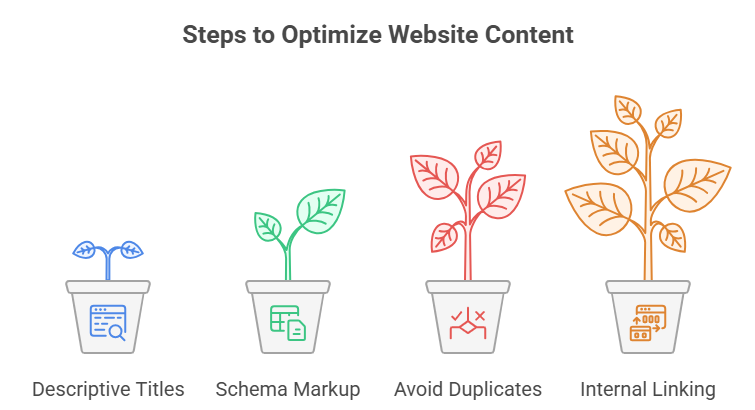
Use descriptive H1 and page titles
Each page needs a unique, clear title that includes relevant keywords naturally. Keep titles under 60 characters so they display fully in search results. Make sure your H1 tags accurately describe what’s on the page to help both users and search engines understand your content.
Apply schema markup for products and FAQs
Schema markup is like giving search engines a cheat sheet for your content. For products, include price, availability, and review information. For FAQs, proper schema helps your questions appear directly in search results. This structured data gives your content the best chance of standing out in search listings.
Avoid duplicate titles and low-value tags
Search engines get confused by repetitive content. Give each page a unique title, description, and purpose. Consolidate similar pages and avoid keyword stuffing in tags, which can actually hurt your rankings instead of helping them. Focus on creating distinct value for each page.
Link internal related pages contextually
Help users and search engines discover all your content by connecting related pages. Use descriptive anchor text with relevant keywords rather than generic “click here” links. This creates a logical path through your site that improves both user navigation and search engine crawling.
Get your website search launch-ready
Taking the time to optimize your website search before launch pays off tremendously. When you build a site that’s ready for both users and search engines from day one, you avoid the common pitfall of launching and then scrambling to fix search issues while losing potential customers. Remember that search optimization isn’t a one-time task but an ongoing process that continues to evolve with your business goals and user needs.
What tools help optimize website search before launch?
Several tools can make pre-launch search optimization easier. Google’s Keyword Planner helps identify search terms your audience uses. PageSpeed Insights tests loading performance. Screaming Frog can audit your site structure to catch technical issues. For WordPress sites, Yoast SEO provides real-time guidance. For testing user interaction with your search functions, tools like Hotjar or Crazy Egg show exactly how people navigate your site.
How do I fix poor search results on my launched site?
If you’ve already launched with subpar search functionality, start by identifying specific problems. Check that search engines can properly crawl your site. Review your content quality and keyword usage. Improve your internal tagging and categorization system. Consider upgrading to a dedicated search solution like Algolia or Elasticsearch if your built-in search isn’t cutting it. Getting user feedback about what they’re trying to find can help prioritize the most impactful fixes.
Does optimizing search boost SEO after launch?
Without a doubt! Good internal search functionality and external SEO work together. When visitors easily find what they need, they stay longer and view more pages, which signals to search engines that your site provides value. The same organizational elements that make your site searchable internally, like clear navigation and logical content structure, also help search engines better understand and rank your pages

Ridam Khare is an SEO strategist with 7+ years of experience specializing in AI-driven content creation. He helps businesses scale high-quality blogs that rank, engage, and convert.



