

The conventional wisdom says product pages should be stuffed with keywords and feature lists. That approach worked in 2015. Today, it’s the fastest way to watch your conversion rates flatline while competitors with half your budget eat your lunch.
Smart ecommerce brands know that product page optimization isn’t about pleasing algorithms anymore – it’s about creating experiences that make both shoppers and search engines happy. When you nail this balance, something magical happens: your pages rank higher AND convert better. Sounds too good to be true? Let me show you exactly how the top performers are pulling this off.
Essential On-Page Elements for Product Page Optimization
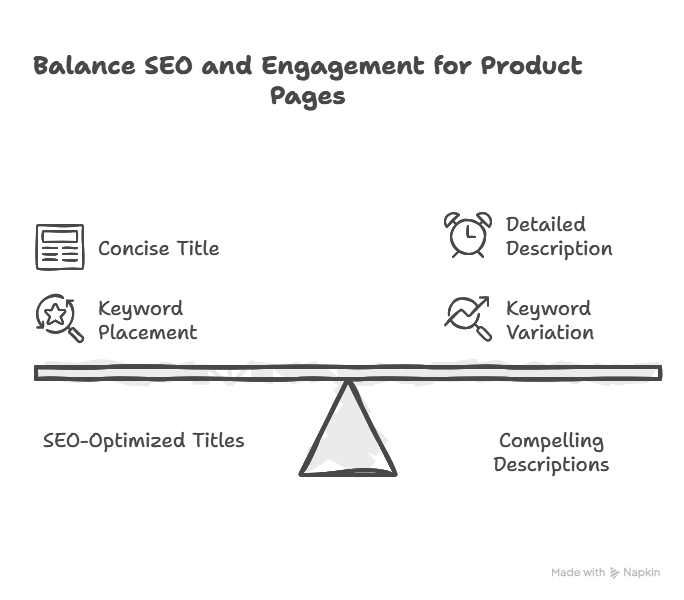
Crafting SEO-Optimized Product Titles and Meta Descriptions
Your product title is the handshake between your page and Google’s crawlers. Most brands mess this up by either keyword stuffing (“Blue Running Shoes Men’s Athletic Footwear Sneakers”) or being too vague (“The Navigator”). Neither works.
The sweet spot? Start with your brand name, follow with the specific product model, then add one defining characteristic. Like this: “Nike Air Zoom Pegasus 40 – Men’s Road Running Shoe.” Clean. Specific. Searchable.
Meta descriptions are where you can get creative. You’ve got 155 characters to convince someone to click. Skip the corporate speak and write like you’re texting a friend about why they need this product. Include your primary keyword naturally, add a benefit, and if there’s room, mention free shipping or your return policy. That’s your click-through rate booster right there.
Writing Compelling Product Descriptions That Convert
Here’s what drives me crazy: brands spending thousands on product photography then slapping on a three-line description copied from the manufacturer. You’re basically handing Google duplicate content on a silver platter and telling customers you don’t care enough to explain why they should buy.
Aim for 150-300 words minimum. But here’s the trick – structure it for scanners:
-
Lead with the transformation (what life looks like after they buy)
-
Hit the key features in bullet points
-
Address the top objection in a single paragraph
-
Close with a use case or scenario
Remember to naturally weave in variations of your target keywords. If you’re selling a yoga mat, don’t just repeat “yoga mat” twelve times. Use “exercise mat,” “workout surface,” “non-slip mat” – Google’s smart enough to connect the dots.
Product URL Structure and Best Practices
Your URL structure should be so simple a five-year-old could guess what’s on the page. Yet I still see URLs like: /products/item?id=48329&cat=15&var=blue.
Stop it.
Use this format: domain.com/category/subcategory/product-name. Real example: yourstore.com/mens-shoes/running/nike-pegasus-40. Notice how I used hyphens, not underscores? That’s because Google treats hyphens as spaces but reads underscores as connectors. Small detail, big impact.
Image Optimization and Alt Text Strategies
Every time I audit an e-commerce site, I find the same problem: gorgeous product photos with file names like IMG_4832.jpg and blank alt text. You’re leaving money on the table.
Here’s your image optimization checklist:
|
Element |
Best Practice |
Example |
|---|---|---|
|
File Name |
Descriptive with hyphens |
nike-pegasus-40-blue-side-view.jpg |
|
Alt Text |
Describe what’s shown + context |
“Nike Pegasus 40 running shoe in blue, side profile showing Air Zoom unit” |
|
File Size |
Under 200KB for product images |
Use WebP format when possible |
|
Dimensions |
Square for main images (1:1 ratio) |
2000x2000px for zoom functionality |
Implementing Schema Markup for Rich Snippets
Schema markup is like giving Google a cheat sheet about your products. Without it, you’re making search engines guess. With it, you get those beautiful rich snippets showing price, availability, and star ratings right in search results.
The Product schema should include at minimum:
-
Name
-
Image
-
Description
-
SKU/MPN
-
Brand
-
Price and currency
-
Availability status
-
Review ratings (if you have them)
Test your markup with Google’s Rich Results Test tool. If it passes, you’re golden. If not, fix it before you do anything else. This is free real estate in search results.
Technical SEO and Performance Optimization
Core Web Vitals Requirements for Product Pages
Google made it crystal clear: slow pages don’t rank. Period. Your Core Web Vitals scores directly impact your visibility, and product pages are notorious for failing these metrics because of heavy images and third-party scripts.
Focus on these three metrics:
-
LCP (Largest Contentful Paint): Should load in under 2.5 seconds. Your hero product image is usually the culprit here.
-
FID (First Input Delay): Keep it under 100 milliseconds. Those fancy product image galleries? They’re probably killing your FID.
-
CLS (Cumulative Layout Shift): Aim for less than 0.1. Reserve space for images and ads so content doesn’t jump around.
The fastest fix? Lazy load everything below the fold and implement critical CSS inline. Just these two changes typically improve scores by 30-40%.
Mobile-First Optimization Strategies
Over 70% of ecommerce traffic is mobile now. Yet most product pages are still designed desktop-first then awkwardly squished down. That’s backwards.
Start with mobile. Make your add-to-cart button thumb-friendly (at least 44×44 pixels). Put critical info – price, availability, main benefit – above the fold. Hide the novel-length descriptions behind a “Read More” toggle. And for the love of conversions, make your images swipeable, not clickable thumbnails that require precision tapping.
What about checkout? Single column. Always. Multi-column forms on mobile are conversion killers.
Internal Linking Architecture for Product Pages
Think of internal links as votes of confidence between your pages. Most sites waste this by only linking to category pages. You’re missing huge opportunities.
Every product page should link to:
-
Related products (obviously)
-
The parent category and subcategory
-
A relevant buying guide or comparison page
-
Complementary items (cross-sells)
-
The brand page (if you carry multiple brands)
But here’s the power move: create product collection pages around use cases (“Best Running Shoes for Marathon Training”) and link bidirectionally. These pages rank like crazy because they satisfy informational AND transactional intent.
Managing Product Variants and Duplicate Content
Color variants are the silent killer of ecommerce SEO. You’ve got the same shoe in five colors, creating five nearly identical pages, and now Google thinks you’re trying to game the system.
The solution? Pick one variant as the canonical version (usually the best seller) and point all others to it using canonical tags. Keep unique URLs for each variant for user experience, but consolidate ranking signals to one page. If a variant has significantly different features or targets different keywords, then treat it as a separate product.
Content Strategy and User Experience Enhancement
Leveraging User-Generated Content and Reviews
Reviews aren’t just social proof – they’re free, keyword-rich content that constantly refreshes your page. A product page with 50+ reviews typically has 3x more long-tail keyword variations than one without. Google loves this fresh, authentic content.
But collecting reviews isn’t enough. You need to optimize them:
“Request reviews 14 days post-purchase (peak satisfaction window). Ask specific questions that naturally generate keywords: ‘How does the fit compare to other running shoes?’ beats ‘Tell us what you think.'”
Display reviews strategically. Show the most helpful ones first, not just the newest. And always respond to negative reviews publicly – it shows you care and gives you another opportunity to naturally include product information.
Creating Product Comparison Tables and Buying Guides
Comparison content is your secret weapon for capturing high-intent shoppers. Someone searching “Product A vs Product B” is ready to buy – they just need that final push.
Build comparison tables directly on your product pages for your top competitors. Yes, you read that right – mention competitors. Being helpful trumps being protective. Structure it honestly but highlight where you win:
|
Feature |
Your Product |
Competitor A |
Competitor B |
|---|---|---|---|
|
Price |
$149 |
$179 |
$129 |
|
Warranty |
Lifetime |
2 years |
1 year |
|
Free Shipping |
Yes |
Orders over $100 |
No |
Optimizing for Voice Search and AI-Powered Queries
Voice search queries are longer and more conversational. Instead of “running shoes men,” people ask “what are the best running shoes for flat feet?” Your product pages need to answer these natural language queries.
Add an FAQ section using question-based headings. Answer concisely in 40-60 words (the sweet spot for featured snippets). Use the exact phrasing people use when talking, not typing. “How do I clean these shoes?” beats “Shoe cleaning instructions.”
A/B Testing Product Page Elements
Stop guessing what works. Test everything. But test smart – most people waste months testing button colors when they should be testing bigger swings.
Priority testing order:
-
Product title format (benefit-first vs feature-first)
-
Image gallery layout (carousel vs grid)
-
Review placement (above vs below fold)
-
Description length (short and punchy vs detailed)
-
CTA button text (“Add to Cart” vs “Buy Now” vs “Get Yours”)
Run tests for at least two weeks and wait for statistical significance. One week of data telling you green buttons convert better means nothing if it’s based on 50 conversions.
Putting Your Product Page Optimization Strategy Into Action
Trying to optimize everything at once is like trying to eat a pizza in one bite. You’ll choke. Start with the fundamentals that move the needle fastest.
Week 1-2: Fix your technical foundation. Run a Core Web Vitals audit, implement Schema markup, and clean up your URL structure. This is your baseline.
Week 3-4: Rewrite your top 20% of product pages (the ones driving 80% of revenue). New titles, compelling descriptions, optimized images. Measure the impact before moving to the rest.
Week 5-6: Launch your review collection campaign and start building comparison content. These take time to gain traction but compound over months.
Week 7-8: Set up your first A/B test and establish a testing calendar. One test at a time, always running, always learning.
The brands crushing it in ecommerce aren’t doing anything magical. They’re just doing the basics consistently while everyone else is chasing the next shiny tactic. Pick one thing from this guide, implement it this week, and measure the results. That’s how you build an optimization machine that actually drives revenue.
Remember: perfect product pages don’t exist, but better ones do. And better is profitable.
Frequently Asked Questions
How many words should a product description contain for optimal SEO?
Shoot for 150-300 words minimum, but quality beats quantity every time. A tight 200-word description that addresses customer concerns and naturally includes keywords will outperform 500 words of fluff. The key is covering what matters: what problem it solves, key features, and why it’s better than alternatives. If you’re selling complex products (like electronics), go longer. Simple products (like t-shirts) can be shorter but should still offer unique value beyond what’s already in the bullets.
What are the most important Core Web Vitals metrics for product pages?
LCP (Largest Contentful Paint) is your biggest priority – aim for under 2.5 seconds. This usually means optimizing your hero product image since that’s typically the largest element. FID (First Input Delay) should stay under 100ms, which means limiting JavaScript execution. CLS (Cumulative Layout Shift) needs to be below 0.1 – reserve space for images and dynamic content. But here’s the thing: obsessing over perfect scores is pointless. Get them into the “good” range and move on. A 90 score that converts beats a 100 score that doesn’t.
Should I optimize each product variant as a separate page?
Only if the variants target different keywords or serve different audiences. A red shirt and blue shirt? Same page with a color selector. But a “waterproof hiking boot” versus “lightweight trail runner”? Different pages. Use canonical tags to consolidate ranking signals when variants are minor (colors, sizes). Create separate pages when variants have distinct features, use cases, or search intent. The litmus test: would someone specifically search for this variant? If yes, give it its own page.
How do I prevent category pages from competing with product pages?
Target different intent with different content. Category pages should target broad, research-phase keywords (“running shoes”). Product pages target specific, purchase-ready keywords (“Nike Pegasus 40”). Make category pages helpful guides – add buying advice, filters, comparison features. Product pages go deep on one item. Also use internal linking strategically: category pages should distribute link equity to products, not hoard it. Think of categories as the storefront and products as the sales floor.
What role does breadcrumb navigation play in product page SEO?
Breadcrumbs are more important than most people realize. They create a clear site hierarchy for Google, distribute link equity efficiently, and actually improve click-through rates from search results (Google often displays them). Always use structured data markup for breadcrumbs. Keep them simple: Home > Category > Subcategory > Product. And make them clickable – they reduce bounce rate by giving users an easy path to explore related products. It’s a small element that impacts rankings, user experience, and conversions.
How often should I update product page content for SEO?
Update when you have something new to say, not on a schedule. Fresh reviews naturally keep pages updated. Beyond that, refresh content when: products get updates or new features, you discover new keywords or search trends, seasonal relevance changes (add “gift” angles before holidays), or conversion rates drop. Meaningless updates just to show “freshness” don’t fool Google. But adding a size guide, new product photos, video content, or addressing common customer questions? That’s the kind of update that impacts rankings and sales.

Ridam Khare is an SEO strategist with 7+ years of experience specializing in AI-driven content creation. He helps businesses scale high-quality blogs that rank, engage, and convert.



