

Most Medium writers obsess over follower counts and claps, thinking that’s the path to visibility. Here’s the uncomfortable truth: Medium’s algorithm couldn’t care less about your follower count if Google can’t find your articles. The real game happens in search – where 43% of Medium’s traffic originates from organic search results, not the platform’s internal discovery features.
5 Expert Wins to Boost Your Medium Article Reach
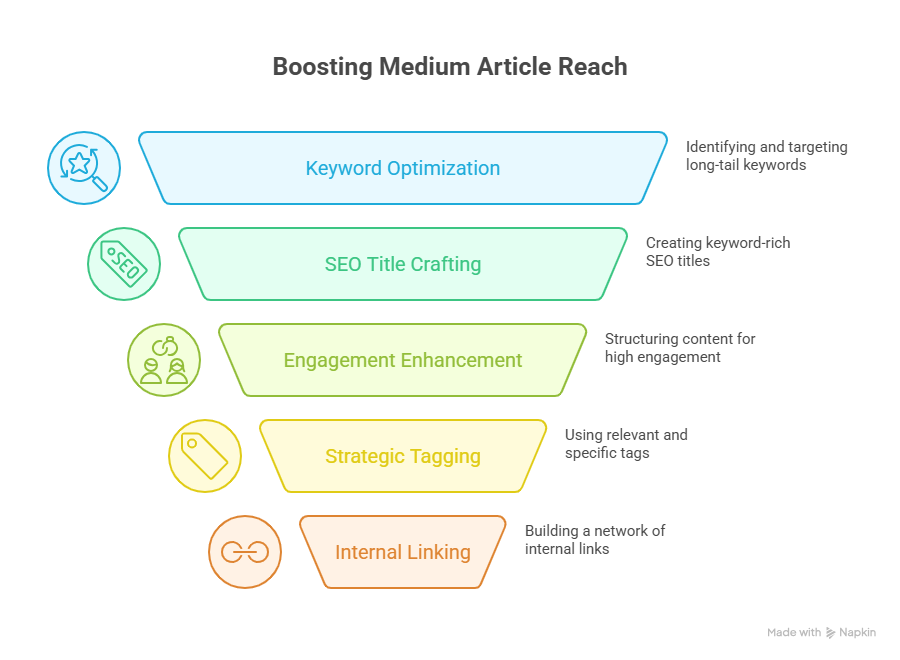
1. Master Long-Tail Keywords
Forget trying to rank for “marketing tips” or “productivity hacks.” You’re competing against publications with millions of followers. The smart play? Target phrases people actually type into Google at 2 AM when they’re desperate for specific answers. Think “how to write cold emails that get responses from CEOs” instead of just “email tips.”
Here’s what actually works: pull up Google’s autocomplete for your topic and look at the weird, specific questions that pop up. Those three-to-five word phrases are gold. They have lower competition and higher intent. Plus, Medium’s domain authority (DA 96!) gives you a fighting chance to rank for them within weeks, not months.
2. Optimize SEO and Display Titles
This is where things get interesting – Medium lets you set two different titles. Your display title (what readers see on Medium) can be clever and catchy. Your SEO title (what Google sees) needs to be keyword-rich and direct. Most writers don’t even know this feature exists.
Want to see this in action? Write your display title first – make it punchy, maybe even controversial. Then click the three dots menu, select “Change display title/subtitle,” and craft an SEO title that includes your target keyword naturally. Keep it under 60 characters so Google doesn’t truncate it. Simple? Yes. Game-changing for visibility? Absolutely.
3. Target High Engagement Signals
Medium measures read time obsessively – down to the second. Articles with 7+ minute read times get pushed harder by the algorithm. But here’s the catch: you can’t just pad your word count with fluff. The platform tracks scroll depth and knows when readers bail.
The trick is structuring your content like a Netflix series. Each section should end with a mini-cliffhanger that pulls readers into the next one. Use short paragraphs (2-3 sentences max), bullet points for scanability, and bold key insights. When someone highlights a sentence on Medium, it boosts your article’s internal ranking. Give them something worth highlighting every 200 words or so.
4. Use Strategic Tag Placement
You get five tags. Don’t waste them on generic terms like “Business” or “Life Lessons” – everyone uses those. Instead, mix one popular tag (for reach) with four specific ones (for relevance). Check what tags successful articles in your niche use, but don’t just copy them blindly.
“The first tag carries the most weight in Medium’s algorithm. Make it count.”
Place your most relevant tag first – this becomes your article’s primary category. Then add tags that match search intent. Writing about remote work productivity? Skip “Productivity” and use “Remote Work,” “Work From Home,” “Digital Nomad,” and “Async Communication.”
5. Build Internal Link Networks
This strategy is criminally underused on Medium. Every article you publish should link to at least two of your other pieces. Not in a spammy “check out my other stuff” way, but naturally, where it adds value. Think of it like building your own Wikipedia within Medium.
The payoff? When one article starts ranking in Google, it pulls your other content up with it. I’ve seen writers triple their overall traffic just by retrofitting old articles with strategic internal links. Takes maybe 20 minutes per article. Worth it.
Advanced Medium SEO Optimization Techniques
Creating Content That Ranks
Publishing at the right time matters less than you think. What really moves the needle is understanding search intent. Are people looking for quick answers or deep dives? Match your content depth to what searchers actually want, not what you think they need.
Study the top-ranking Medium articles for your target keywords. Notice their structure and word count and headline style. Don’t copy – but understand why they work. Usually it’s because they answer the actual question quickly, then provide supporting detail. Most writers do it backwards.
Formatting for Maximum Readability
Medium’s editor is deceptively simple, but proper formatting can double your read time. Use H1 for your title (automatic), H2 for main sections, and H3 for subsections. Never go deeper than H3 – it confuses both readers and search engines.
-
Pull quotes: Highlight your best insights visually
-
Code blocks: Perfect for step-by-step instructions
-
Separator lines: Create visual breaks between major ideas
-
Image captions: Add context and keywords naturally
White space is your friend. Hit enter twice between paragraphs. Let your content breathe.
Leveraging Medium’s Domain Authority
Medium sits at DA 96 – higher than most company blogs will ever reach. This means your article on Medium can outrank established websites for competitive keywords. But there’s a catch: you’re also competing with every other Medium writer targeting those same terms.
The workaround? Target keywords that traditional websites ignore. How-to guides, personal experiences, controversial takes – content that brands won’t touch but readers desperately want. Your “Why I Quit My $200k Job” article will rank faster than any corporate blog’s “5 Career Tips” post.
Image Optimization Best Practices
Every image should earn its place. Medium automatically compresses images, but that doesn’t mean you should upload 5MB files. Aim for under 200KB per image. Use Unsplash’s Medium integration for free stock photos that load fast and look professional.
But here’s what most writers miss: image captions get indexed by search engines. Don’t just write “Photo by John Doe on Unsplash.” Describe what the image shows and naturally include relevant keywords. Think of captions as mini-paragraphs that support your SEO strategy.
Maximize Your Medium Success
The writers crushing it on Medium aren’t necessarily the best writers. They’re the ones who understand that SEO for Medium isn’t about gaming the system – it’s about making your content discoverable to people who need it. Start with one article, apply these five wins, and watch what happens to your stats over the next 30 days.
Remember: Medium’s algorithm changes, but search intent doesn’t. Focus on solving real problems for real people, and both Medium and Google will reward you. The traffic is there. The question is whether you’ll position yourself to capture it.
Frequently Asked Questions
How does Medium’s high domain authority help my SEO efforts?
Medium’s DA 96 means your articles start with massive credibility in Google’s eyes. You can rank for competitive keywords that would take years to crack on a personal blog. The tradeoff? You’re sharing that authority with millions of other writers, so your on-page SEO needs to be sharp.
What’s the difference between SEO titles and display titles on Medium?
Display titles show up on Medium’s platform – they can be creative, emotional, even clickbait-y. SEO titles appear in Google search results. They should include your target keyword and clearly state what the article delivers. Think “catchy for humans” vs “clear for algorithms.”
Should I republish my existing content on Medium?
Yes, but use Medium’s import tool to avoid duplicate content penalties. It automatically adds a canonical link back to your original post. Wait at least two weeks after publishing on your main site before importing to Medium. This strategy can double your content’s reach without extra writing.
How important are tags for Medium article visibility?
Tags determine which readers and publications discover your content within Medium. They’re crucial for internal distribution but don’t directly impact Google rankings. Your first tag matters most – it sets your article’s primary category. Choose wisely.
Can I track SEO performance for my Medium articles?
Medium’s built-in stats show traffic sources, including Google. For deeper insights, add your Medium profile to Google Search Console as a property. You can’t add tracking pixels, but UTM parameters work for tracking specific campaigns. Most writers never check their search performance data. Don’t be most writers.

Ridam Khare is an SEO strategist with 7+ years of experience specializing in AI-driven content creation. He helps businesses scale high-quality blogs that rank, engage, and convert.



